Bostitch Impulse 30 Electric Stapler, 30 Sheet Capacity, Black (2210)
$39.99
1

Highlights
View all details
- 3X FASTER STAPLING SPEED – Bostitch Impulse Drive Technology allows users to immediately remove stacks on paper after the stapler pierces the sheets. No need to wait for the machine to retract like with other electric staplers
- NO JAM TECHNOLOGY eliminates staple jams. All Bostitch staplers are made using high quality processes and materials. This unique technology was developed by Bostitch Engineers specifically for our electric staplers
- REFILL ALERT LIGHT – No more guessing when your stapler is out of staples. This unit features a light that turns on when your unit is low on staples.
Bostitch Impulse 30 Electric Stapler, 30 Sheet Capacity, Black (2210)
Item #: 790113Model #: 02210
$39.99
Free Returns
Online. In store. Always free.
Learn More

1
1
2
3
4
5
6
7
8
9
10
11
12
13
14
15
16
17
18
19
20
21
22
23
24
25
26
27
28
29
30
Over 30
Add to list
Consider this similar product


About this product
Tackle extensive stapling tasks with this Bostitch small black automatic electric compact desktop stapler
The Impulse 30 Electric Stapler is a speedy stapler that suits any home or office. Tired of using a manual fastener multiple times a day? Tired of staple jams and sore wrists? If you staple documents more than a couple times a day, an automatic staple is the upgrade you deserve. Stapling up to 30 sheets is faster than ever with the exclusive Impulse Drive design providing 3x* faster stapling speed
- 3X FASTER STAPLING SPEED – Bostitch Impulse Drive Technology allows users to immediately remove stacks on paper after the stapler pierces the sheets. No need to wait for the machine to retract like with other electric staplers
- NO JAM TECHNOLOGY eliminates staple jams. All Bostitch staplers are made using high quality processes and materials. This unique technology was developed by Bostitch Engineers specifically for our electric staplers
- REFILL ALERT LIGHT – No more guessing when your stapler is out of staples. This unit features a light that turns on when your unit is low on staples.
- STAPLE STORAGE COMPARTMENT – If you’re buying an automatic stapler, we know you’re probably stapling quite a bit and going through a ton of staples. That’s why we developed a hidden staple storage compartment, so you don’t have to constantly visit the supply closet to refill
- EASY PUSH-BUTTON RELOADING – We know your day is hard. Reloading your electronic stapler shouldn’t be. Simply push a button and the magazine pops out to insert a new strip of staples.
- STAPLES UP TO 30 SHEETS – This is truly a heavy-duty unit and can take on large stapling tasks. Best of all, it uses standard ¼ in staples
- Uses Standard Staples (SBS191/4CP)
The Impulse 30 Electric Stapler is a speedy stapler that suits any home or office. Tired of using a manual fastener multiple times a day? Tired of staple jams and sore wrists? If you staple documents more than a couple times a day, an automatic staple is the upgrade you deserve. Stapling up to 30 sheets is faster than ever with the exclusive Impulse Drive design providing 3x* faster stapling speed. You'll get the job done faster and more efficiently than ever before. Our innovative No-Jam technology puts an end to frustrating staple jams. You won't have to stop to dig out annoying staple jams. Hate running out of staples? The handy refill alert light indicates when staples need to be reloaded. Each Bostitch electric stapler also features a FastLoad push-button staple refill system that makes reloading quick and effortless. Just press a button to release the staple magazine, load staples right from the integrated storage compartment, and get back to work. Each stapler is UL Listed and available in Classic Black, White, and a Value Kit that includes a Black electric stapler with a built-in push-style staple remover and 5,000 standard staples
Frequently bought together
Page 1 of 4


Price is $4.09
Unit of measure 5000/Box
Delivery by Tue, Jun 09
1
1
2
3
4
5
6
7
8
9
10
11
12
13
14
15
16
17
18
19
20
21
22
23
24
25
26
27
28
29
30
Over 30
Add to list


Price is $8.99
Delivery by Tue, Jun 09
1
1
2
3
4
5
6
7
8
9
10
11
12
13
14
15
16
17
18
19
20
21
22
23
24
25
26
27
28
29
30
Over 30
Add to list


Price is $5.29
Unit of measure 50/Pack
Delivery by Tue, Jun 09
1
1
2
3
4
5
6
7
8
9
10
11
12
13
14
15
16
17
18
19
20
21
22
23
24
25
26
27
28
29
30
Over 30
Add to list

Price is $7.49
Delivery by Tue, Jun 09
1
1
2
3
4
5
6
7
8
9
10
11
12
13
14
15
16
17
18
19
20
21
22
23
24
25
26
27
28
29
30
Over 30
Add to list

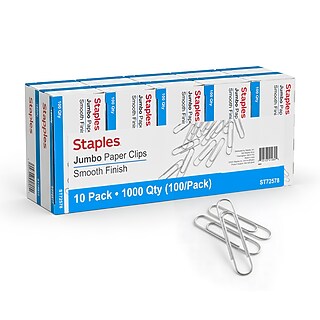
Price is $14.99
Unit of measure 1000/Pack Price per unit $0.02/Paper Clip
Delivery by Tue, Jun 09
1
1
2
3
4
5
6
7
8
9
10
11
12
13
14
15
16
17
18
19
20
21
22
23
24
25
26
27
28
29
30
Over 30
Add to list








Compare similar items
| Attributes | Bostitch Impulse 30 Electric Stapler, 30 Sheet Capacity, Black (2210) | Bostitch Impulse 30 Value Kit Heavy Duty Electric Desktop Stapler, 30-Sheet Capacity, Staples Included, Black (02638) | Swingline Breeze Reduced-Effort Electric Desktop Stapler, 20-Sheet Capacity, Black/White (42131/43132) | Swingline Reduced-Effort Desktop Stapler, 20-Sheet Capacity, Black (44401) | Bostitch Impulse 30 Electric Desktop Stapler, 30-Sheet Capacity, White (02011) |
|---|---|---|---|---|---|
Your product Bostitch Impulse 30 Electric Stapler, 30 Sheet Capacity, Black (2210) Price is $39.99 |  Price is $54.99 |  Price is $69.99 |  Price is $11.99 |  Price is $44.99 | |
| Reviews | |||||
| Delivery Information | Free delivery by Tue, Jun 09 | Free delivery by Tue, Jun 09 | Free delivery by Tue, Jun 09 | Delivery by Tue, Jun 09 | Free delivery by Tue, Jun 09 |
| Available in my store | No | Yes | No | No | No |
| Warranty Information | 7 Year | 7 Year | 1 Year | Limited Lifetime Warranty | 7 Year |
| Staple Leg Length (mm) | 6 | 6 | 6 | 6 | 6 |
| Capacity (Number of pages) | 30 | 30 | 20 | 20 | 30 |
| Item Material | Plastic | Plastic | Plastic | Metal | Plastic |
| Heavy-Duty | Standard | Heavy Duty | Standard | Standard | Standard |
| Staple Leg Length (Inches) | 1 / 4 | 1 / 4 | 1 / 4 | 1 / 4 | 1 / 4 |
| Capacity (Sheets) | 21-30 Sheet Capacity | 21-30 Sheet Capacity | 11-20 Sheet Capacity | 11-20 Sheet Capacity | 21-30 Sheet Capacity |
| Stapler Style | Desktop | Desktop | Desktop | Desktop | Desktop |
| True Color | Black | Black | Black / White | Black | White |
| Stapler Type | Standard | Standard | Standard | Standard | Standard |
| Staple Size | 26 / 6 | 26 / 6 | 23 / 6 | 23 / 6 | 26 / 6 |
| Selling Quantity | 1 | 1 | 1 | 1 | 1 |
| Staples Included | Staples Not Included | Staples Included | Staples Not Included | Staples Not Included | Staples Not Included |
| Selling Quantity (UOM) | Each | Each | Each | Each | Each |
| Stapler Strip Size | Full-Strip Cartridge | Full-Strip Cartridge | Half-Strip Cartridge | Full-Strip Cartridge | Full-Strip Cartridge |
| Electric or Manual | Electric | Electric | Electric | Manual | Electric |
| Staple Type | Paper | Paper | Paper | Paper | Paper |
| Add To Cart | Add To Cart | Add To Cart | Add To Cart |
Featured Products
Page 1 of 3


Price is $15.69
Unit of measure 6/Pack Price per unit $2.62/Envelope
Delivery by Fri, Jun 12
1
1
2
3
4
5
6
7
8
9
10
11
12
13
14
15
16
17
18
19
20
21
22
23
24
25
26
27
28
29
30
Over 30
Add to list


Price is $17.29
Unit of measure 12/Pack Price per unit $1.44/Sheet Protector
Delivery by Fri, Jun 12
1
1
2
3
4
5
6
7
8
9
10
11
12
13
14
15
16
17
18
19
20
21
22
23
24
25
26
27
28
29
30
Over 30
Add to list


Price is $14.89
Unit of measure 2/Pack
Delivery by Fri, Jun 12
1
1
2
3
4
5
6
7
8
9
10
11
12
13
14
15
16
17
18
19
20
21
22
23
24
25
26
27
28
29
30
Over 30
Add to list


Price is $16.89
Unit of measure 2/Pack
Delivery by Fri, Jun 12
1
1
2
3
4
5
6
7
8
9
10
11
12
13
14
15
16
17
18
19
20
21
22
23
24
25
26
27
28
29
30
Over 30
Add to list


Price is $12.09
Unit of measure 25/Pack
Delivery by Fri, Jun 12
1
1
2
3
4
5
6
7
8
9
10
11
12
13
14
15
16
17
18
19
20
21
22
23
24
25
26
27
28
29
30
Over 30
Add to list