Facebook Twitter YouTube LinkedIn
  • Welcome, Log in please.
  • Free shipping on staples.com for Rewards members.
Skip Navigation
Ink Toner Finder

Ink & Toner Finder:

  • Cartridge Number
    • Cartridge Number
    • Printer Model #
Weekly Ad
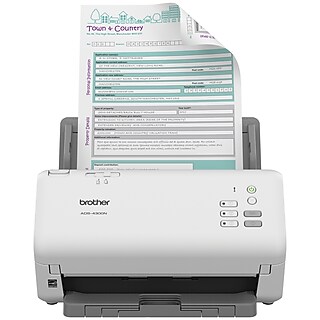
Xerox DocuMate 3115 Document Scanner with Docking Station

Xerox DocuMate 3115 Document Scanner with Docking Station

Item: 899375    Model: CN4671

  • Compact Duplex Scanner with 20-page automatic document feeder (ADF); Use as a desktop ADF scanner in docking station or undock and take just the USB powered scanner on the road
  • 24-bit Color; 600-dpi resolution
  • Convert documents into searchable PDF files with One Touch®
See more details
Compact Duplex Scanner with 20-page automatic document feeder (ADF); Use as a desktop ADF scanner in docking station or undock and take just the USB powered scanner on the road24-bit Color; 600-dpi resolutionConvert documents into searchable PDF files with One Touch®EachDocument Scanner w/ Docking StationCompact Duplex Scanner with 20-page automatic document feeder (ADF); Use as a desktop ADF scanner in docking station or undock and take just the USB powered scanner on the road24-bit Color; 600-dpi resolutionConvert documents into searchable PDF files with One Touch®Xerox DocuMate 3115 Document Scanner with Docking Stationhttp://s7d5.scene7.com/is/image/Staples/s0392426_sc7?$std$http://s7d5.scene7.com/is/image/Staples/s0392426_sc7?$thb$http://www.staples.com/sbd/img/res/ic/ic016-windows.gifhttp://www.staples.com/sbd/img/res/ic/ic016-mac.gifhttp://www.staples.com/sbd/img/res/ic/ic045-windows.gifhttp://s7d5.scene7.com/is/image/Staples/s0392426/Xerox-DocuMate-3115-Document-Scanner-with-Docking-Station/product_899375Xerox DocuMate 3115 Document Scanner with Docking Station0.00
Price:
$399.99
Each

Currently Out of Stock.

Add to Favorites


Do you have questions about this product?(earn points for answers!)

get answers from real customers and in-house experts with AnswerBox.

12 Questions | 10 Answers
Displaying questions 1-10Previous | Next »
  • Q:

    Is this product compatable with Quickbooks ?? To send information directly to Quickbooks ??
    Asked on 1/3/2012 by Anonymous

    1 answer

    • CUSTOMER CARE

      A:

      When scanning documents, it will be necessary to create a file for them on your computer. The file can then be used by Quickbooks.

      Answered on 1/18/2012 by Darlene S from Staples
  • Q:

    Can this product scan x-rays (negatives of 6 x 12") into computer programs?
    Asked on 11/18/2011 by Deb from NY

    1 answer

    • CUSTOMER CARE

      A:

      This scanner is decigned to handle documents and ID cards. The front feed slot accepts documents from letter/legal/A4 size to photos, receipts and plastic ID cards. May I suggest the Staples item #325740 which is a negative scanner.

      Answered on 12/2/2011 by Laura B from Staples
  • Q:

    Does this product have memory space on it? Does it automactically save a log of the documents scanned on the actual scanner(not talking about on my computer)?
    Asked on 11/8/2011 by Anonymous

    1 answer

    • CUSTOMER CARE

      A:

      I received your inquiry through the Question and Answer Feature of Staples.com because your inquiry is specific in nature it would be best resolved by the manufacture. You may contact Xerox Scanners at (800) 648-0410. I apologize for any inconveniences experienced.

      Answered on 11/9/2011 by Laura B from Staples
  • Q:

    is the duplex scanning on this item automatic, or will I have to turn the pages around and reconfigure them in page order before saving the document?
    Asked on 8/26/2011 by Curious from Upstate NY

    0 answers(earn bonus points)

  • Q:

    A previous question asked if the text would be searchable in Word format. The answer said it is searchable in PDF; however, what about in Word format as asked?
    Asked on 4/22/2011 by Jeff from Newark, NJ

    1 answer

    • CUSTOMER CARE

      A:

      According to Xerox, as long as your documents are be scanned in an SPDF format, your documents will be searchable in a Microsoft Word format. To place an order for this product, please contact us at 1-800-333-3330.

      Answered on 4/27/2011 by Liz C from Staples
  • Q:

    Is it possible to configure the Documate to automatically scan perform OCR and save the document in a text searchable Word format?
    Asked on 3/30/2011 by Jim

    1 answer

    • CUSTOMER CARE

      A:

      Yes, this scanner has an OCR feature that can automatically scan to a searchable PDF while keeping the integrity of the document or photo intact. If you would like assistance with placing an order, please contact us at 800-333-3330.

      Answered on 4/7/2011 by Renee L from Staples
  • Q:

    does it give me the options of email directly and scan to my hard drive?
    Asked on 3/16/2011 by robert from texas

    1 answer

    • CUSTOMER CARE

      A:

      This unit will give you 6 scanning options, which includes direct to email, direct to a Word document, direct to printer, or direct to a choosen file on the computer's hard drive.

      Answered on 5/2/2011 by Darlene S from Staples
  • Q:

    How good is the quality of scanned photos? Is it better for documents or photos? I am looking to purchase a portable scanner to scan all the family photos and to travel to my hometown and scan family photos there as well. So I need something fast, good quality or at least equal quality of the photo.
    Asked on 2/28/2011 by Rhonda from Ky

    1 answer

    • CUSTOMER CARE

      A:

      This is a document scanner with the scan resolution of 24-bit Color; 600-dpi resolution. It was manufactured to scan documents not photos. For a more portable personal scanner may I suggest item # 906084 which also scans up to 600-dpi resolution.

      Answered on 3/15/2011 by Laura B from Staples
  • Q:

    Can the documents be scanned to a disc? If so, what type of disc do I need to purchase? Would I have to scan the documents to my computer first and then move them to the disc and external hard drive? I am not very knowledgable about computers, I just have lots of paper documents I want to store on disc and/or on an external hard drive (preferablly on both for backup reasons). I don't want to store the documents on my computer due to the limited amount of memory on my computer.
    Asked on 2/11/2011 by Nan the Newbie from Delaware

    1 answer

    • CUSTOMER CARE

      A:

      You're right! You'd want to scan them to your computer in order to put them on a disc. If you have an external drive attached to your computer, you should be able to select it as the automatic destination for the files you create!

      Answered on 2/18/2011 by Steve S. from Staples
  • Q:

    Does this product scan two sided documents?
    Asked on 1/20/2011 by Anonymous

    1 answer

    • CUSTOMER CARE

      A:

      Yes, it does!

      Answered on 1/28/2011 by Rebecca P from Staples
Displaying questions 1-10Previous | Next »

Do you have a question about this product? 

Staples® 50/Pack 700MB CD-R, Spindle
Item: 452555
Model: 10365

Staples® 50/Pack 700MB CD-R, Spindle

Reviews for Staples® 50/Pack 700MB CD-R, Spindle
4.5stars
(366 reviews)
  • 50/Pack spindle
  • 700MB/80 minutes
  • R = write once

Special BuySpecial Buy

Reg : $19.99
Save: - $8.00
Price after savings: $11.99 50/Pack
Reg. $19.99
Final Price: $11.99
50/Pack
Total Savings: $8.00 See Details
Staples 5mm Slim Jewel Cases, 50/Pack
Item: 445567
Model: 10378-CC

Staples 5mm Slim Jewel Cases, 50/Pack

Reviews for Staples 5mm Slim Jewel Cases, 50/Pack
4.5stars
(988 reviews)
  • 5mm single cases
  • 50/Pack
  • Hard, durable plastic
Price:
$14.99
50/Pack
Staples® CD/DVD Labels, 50/Pack
Item: 501798
Model: 33013-CC

Staples® CD/DVD Labels, 50/Pack

Reviews for Staples® CD/DVD Labels, 50/Pack
3.5stars
(98 reviews)
  • Premium quality white labels
  • 50 labels in a pack
  • For use with LabelCreator Pro software
Price:
$14.99
50/Pack