Productivity Ultrawide Monitors

49 results
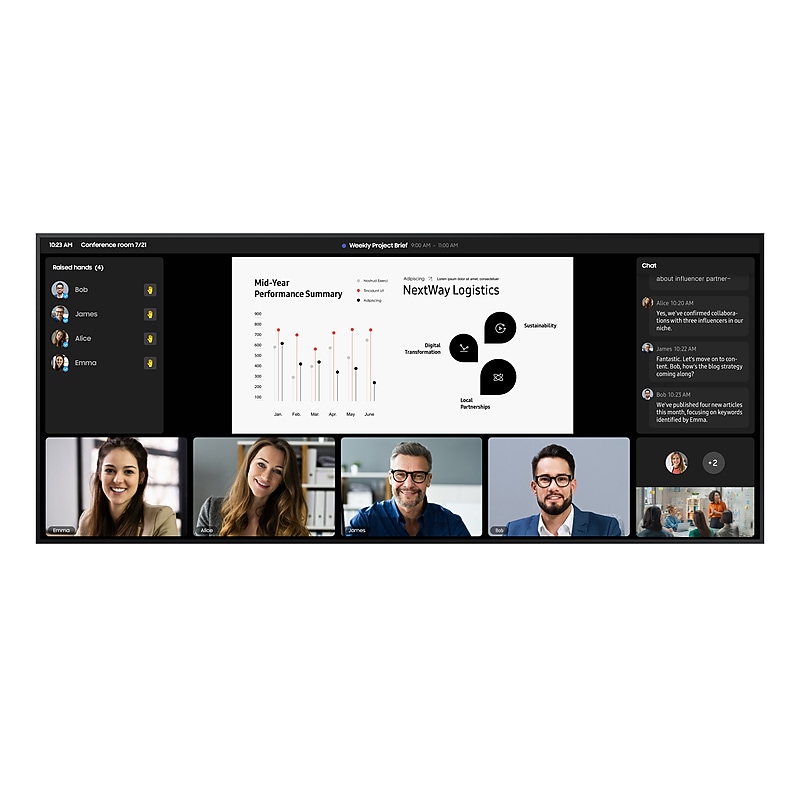
Samsung QPDX-5K series 105" Wall Mounted 5K UHD Display for Digital Signage (QP105DX-5K) image 1
Item: 24675524
Model: QP105DX-5K

Samsung's QPDX-5K Series takes business to the next level with a 105-inch supersized display. The 21:9 aspect ratio of the Ultra-Wide screen is optimized for a video conference layout, and provides an immersive meeting environment whether in-person or remote. With a depth of just 48.1mm, this 105-inch display is the slimmest in its class, and the outward-facing ports enable flush wall mounting. Consistent, even bezels on all four sides preserve the visual quality and accuracy of the display between landscape and portrait modes. Ultra-clear 5K Resolution delivers sharper images and finer details, and reliable non-glare panels provide better visibility from all angles. SMARTVIEW+ enables wireless screen-sharing and supports up to 10 screens at once for seamless collaboration. Users can mirror screens and charge devices at the same time with the enhanced connectivity of the USB Type-C port, while the OPS (Open Pluggable Specification) eliminates the need for additional PCs or devices. Home UI boosts usability by displaying popular categories all in one place. Smart Calibration fine-tunes each screen, bringing logos and visuals to life with precise, vibrant colors. Built-in Professional Modes open up new possibilities for specialized industries, including those in film-making and the medical field. Cloud-based Samsung VXT enables remote management of hardware settings and makes it easy to create and deploy content from another location. Equipped with Samsung SmartThings Pro for energy-efficiency, the QPDX-5K series has received ENERGY STAR® and EPEAT certifications..Experience a new level of collaboration with Samsung’s 21:9 ultra-wide 5K display..W x H x D - 97.8 x 42 x1.9 in.HDMI 2.1 (3), DP 1.4 (1), USB-C, OPS, USB Type-A (2), Type-C (1), RS232C (In/Out), RJ45 (In).WARNING: Cancer And Reproductive Harm - www.P65Warnings.ca.gov

Price is  $9489.99
1
2
3
4
5
6
7
8
9
10
11
12
13
14
15
16
17
18
19
20
21
22
23
24
25
26
27
28
29
30
Over 30
Add to list
No reviews yet

About Productivity Ultrawide Monitors

Productivity ultrawide monitors are designed to enhance your workspace by providing an expansive viewing area that allows for multitasking and improved workflow. With a wider screen real estate, these monitors enable users to view multiple applications side by side, reducing the need for multiple displays and creating a more organized work environment.

These monitors are particularly beneficial for professionals in fields such as graphic design, video editing, and data analysis, where detailed visuals and extensive timelines are essential. The immersive experience offered by ultrawide monitors can significantly boost productivity and focus, making them a valuable addition to any office setup.

When selecting a productivity ultrawide monitor, consider features such as screen curvature, resolution, and refresh rate. Curved screens can provide a more immersive experience, while higher resolutions ensure that images and text remain sharp and clear, even at larger sizes.

Additionally, look for monitors with built-in docking stations and multiple connectivity options to streamline your workspace. Features like adjustable stands and blue light filters can also enhance comfort during long working hours, making productivity ultrawide monitors an excellent investment for any professional.

What are productivity ultrawide monitors?

  • Productivity ultrawide monitors are large displays that offer a wider aspect ratio, allowing users to work more efficiently by displaying multiple applications simultaneously. They are ideal for multitasking and enhancing overall workflow.

How do ultrawide monitors improve productivity?

  • Ultrawide monitors improve productivity by providing more screen space, which reduces the need for multiple monitors and allows users to view more information at once. This can lead to faster task completion and better organization.

What features should I look for in an ultrawide monitor?

  • Key features to consider include screen curvature for an immersive experience, high resolution for clarity, refresh rate for smooth visuals, and connectivity options for easy integration with other devices. Adjustable stands and ergonomic designs can also enhance comfort.

Are ultrawide monitors good for gaming?

  • Yes, many ultrawide monitors are designed with gaming in mind, offering high refresh rates and low response times for an enhanced gaming experience. They also provide a wider field of view, making gameplay more immersive.

Can I use an ultrawide monitor for video editing?

  • Absolutely, ultrawide monitors are excellent for video editing as they allow editors to view timelines, previews, and tools simultaneously. The increased screen space helps streamline the editing process and improves workflow efficiency.

Do ultrawide monitors require special graphics cards?

  • While many modern graphics cards support ultrawide monitors, it's essential to check compatibility, especially for higher resolutions and refresh rates. Ensure your graphics card can handle the monitor's specifications for optimal performance.