Triple Screen Workstations

49 results
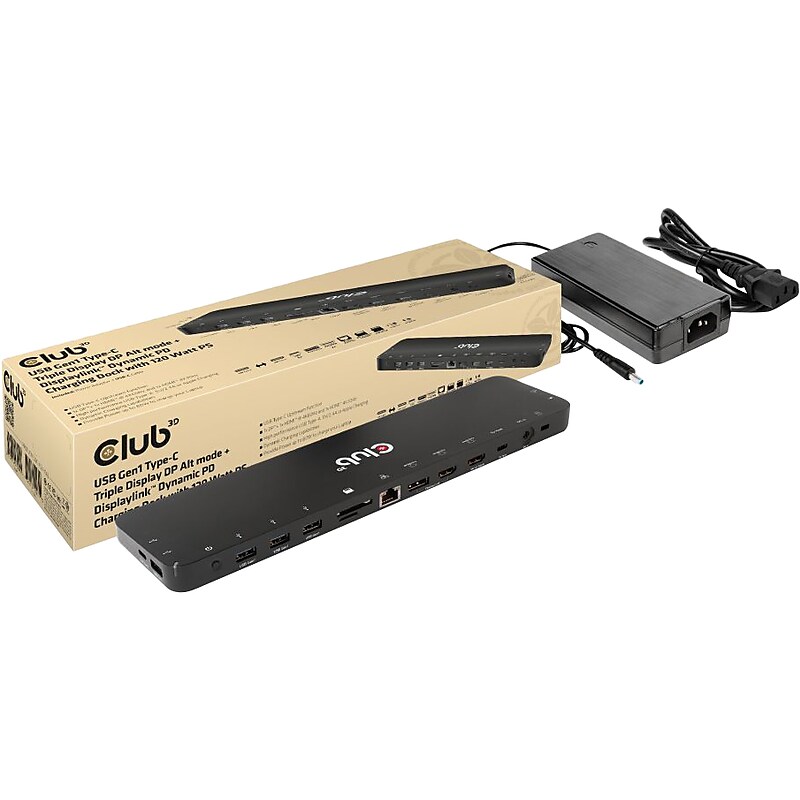
Club 3D USB Gen 1 Type-C Charging Dock, Black (CSV-1566) image 1
Item: IM19VT147
Model: CSV-1566

The Club 3D USB Gen1 Type-C Triple Display DP Alt mode + Displaylink/ USB mode Dynamic PD charging dock with 120W PS, is an integrated solution combining Video, Data, Power, Ethernet and Audio. This dock is perfectly suited for extending a Type-C port or USB-A port(via a Type-C to USB converter) to provide multiple audio, video, data and power ports, providing an perfect solution to satisfy users who require multiple ports. This dock has 3 video ports (2 HDMI, one from DP 1.2 Alt mode, one from USB mode, 1 Displayport from USB mode) for video experience, 4 USB Gen1 Type-A and 1 USB Gen1 Type-C for data transmission, RJ45 for super high speed Ethernet, SD/TF card slots for connecting memory cards. Besides, it has a smart charging port, bringing fast charging performance for connected mobile device(Apple, Samsung phones, pads,etc). A 120W power adapter is provided to supply power for the function of this dock and charge the host with max 80W (20V/4A). This dock is a bottom design with can be put underneath the host. It can work on DP 1.2 Alt mode supported USB Type-C and -A hosts..This dock is perfectly suited for extending a Type-C port or USB-A port to provide multiple audio, video, data and power ports.Dimensions: 0.7"H x 11.97"W x 3.03"D.Supports DP1.2 Alt Mode and DisplayLink/USB mode.Designed for extending a USB Type-C port or Type-A port (by connecting a Type-C to Type-A converter) to become multiple video, data, and power ports.Allows outputting triple videos (dual 4K/60Hz+4K/30Hz) to work simultaneously with MST under both Mac and Windows systems.Supports smart charging with up to 5V/2.4A.Supports Gigabit Ethernet for superfast connection.Support UHS-I SD3.0 with max 104Mbps, allow two card slots to work simultaneously.Meets or exceeds ROHS, FCC, and CE EMI standards

Price is  $295.89
1
2
3
4
5
6
7
8
9
10
11
12
13
14
15
16
17
18
19
20
21
22
23
24
25
26
27
28
29
30
Over 30
Add to list
No reviews yet

About Triple Screen Workstations

Triple screen workstations are designed to enhance productivity by providing ample screen real estate for multitasking and efficient workflow management. Ideal for professionals in fields such as design, finance, and programming, these setups allow users to view multiple applications simultaneously, reducing the need for constant window switching.

With a triple monitor configuration, users can enjoy a more immersive experience, whether for gaming, video editing, or data analysis. This arrangement not only maximizes workspace but also promotes better organization and accessibility of information, leading to improved efficiency.

When selecting a triple screen workstation, consider features such as adjustability, compatibility with various monitor sizes, and ergonomic design. Many models offer articulating arms or stands that allow for easy positioning and tilting of monitors, ensuring optimal viewing angles and reducing neck strain during extended use.

Additionally, look for workstations that support cable management solutions to keep your workspace tidy and free from clutter. Some setups also include docking stations for seamless connectivity, allowing for easy access to peripherals and enhanced functionality, making them a great choice for any professional environment.

What is a triple screen workstation?

  • A triple screen workstation is a setup that incorporates three monitors to provide an expanded workspace for enhanced productivity. This configuration is particularly beneficial for multitasking and managing multiple applications simultaneously.

What are the benefits of using a triple monitor setup?

  • Using a triple monitor setup increases screen space, allowing users to view more information at once. This can lead to improved workflow, better organization, and reduced time spent switching between applications.

How do I choose the right triple monitor stand?

  • When choosing a triple monitor stand, consider factors such as monitor size compatibility, adjustability features, and the overall stability of the stand. Look for models that offer ergonomic adjustments to enhance comfort during use.

Can I use different monitor sizes in a triple screen workstation?

  • Yes, many triple screen workstations can accommodate different monitor sizes, but it's essential to ensure that the stand or mount can support the weight and dimensions of each monitor. Consistent sizing can provide a more uniform viewing experience.

Are triple screen workstations suitable for gaming?

  • Absolutely! Triple screen workstations can enhance the gaming experience by providing a wider field of view and more immersive gameplay. Many gamers prefer this setup for its ability to display multiple game elements simultaneously.

Do I need special cables for a triple monitor setup?

  • Depending on your monitors and graphics card, you may need specific cables to connect all three screens. Ensure that your hardware supports multiple displays and check for the appropriate connection types, such as HDMI, DisplayPort, or VGA.