USB Microphones for PC

50 results
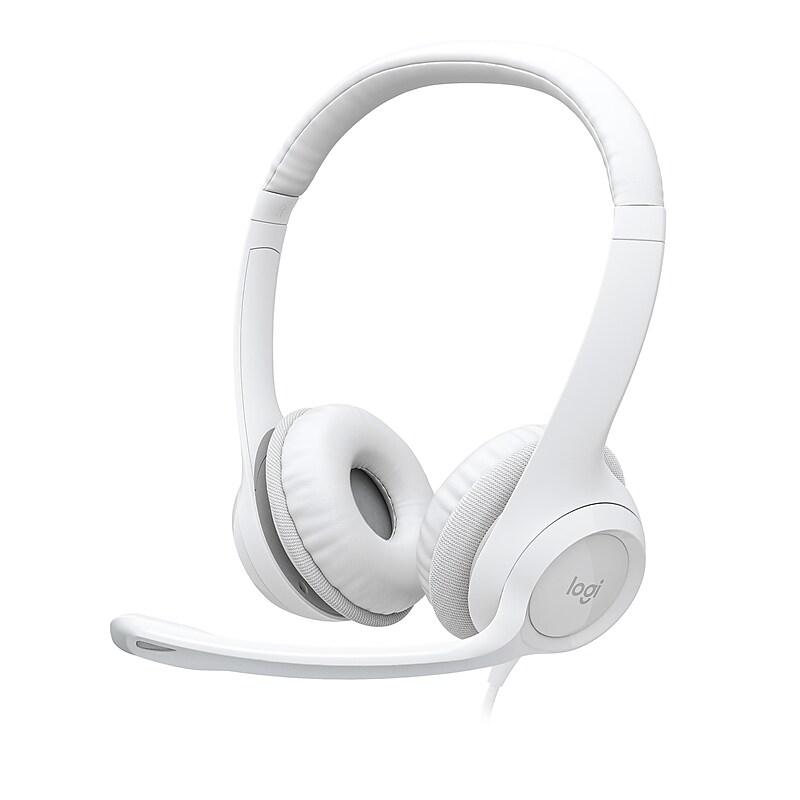
Logitech H390 Noise Canceling Stereo Headset, White (981-001285) image 1
Item: 24555562
Model: 981-001285

Experience clear audio for video meetings with a simple plug-and-play USB connection and a noise-canceling mic. Rigid left-sided mic boom is moveable and can be tucked out of the way when you're not using it. Handy in-line controls let you adjust volume or mute without interrupting calls. Fine-tuned drivers deliver enhanced digital audio for meetings, music, and more..Digital Stereo Sound: Fine-tuned drivers provide enhanced digital audio for music, calls, meetings and more.Rotating Noise Canceling Mic: Minimizes unwanted background noise for clear conversations; the rotating boom arm can be tucked out of the way when you’re not using it.Handy In-line Controls: Simple in-line controls on the headset cable let you adjust the volume or mute calls without disruption.Plug-and-Play USB Computer Headset: Simply plug the USB-A connector into your computer and you’re ready to talk or listen without the need to install software.Padded Comfort: Comfortable headphones with adjustable headband features swivel-mounted, leatherette ear cushions for hours of comfort and is easy to clean.Move Freely With Long Cable: The 6.23' (1.9 m) USB A cable is just the right length to give you the freedom to stand up and stretch during long conversations.Works With Chromebook: H390 headphones are tested and certified, which means it meets Google’s compatibility standards and works seamlessly with your Chromebook.Sustainable Design: Plastic parts in H390 Logitech Headset includes post-consumer recycled plastic (23%*); uses FSC-certified paper for responsible packaging.Safety Data Sheet.Logitech H390 USB Computer Headset with enhanced digital audio and in-line controls
Price is  $24.99
1
2
3
4
5
6
7
8
9
10
11
12
13
14
15
16
17
18
19
20
21
22
23
24
25
26
27
28
29
30
Over 30
Add to list
1149
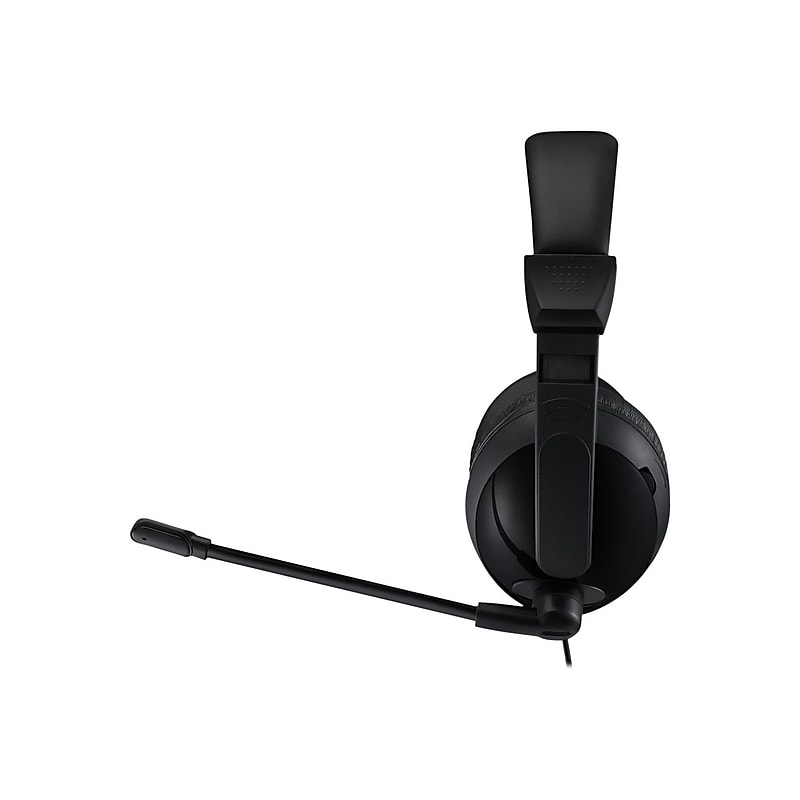
Adesso Xtream Stereo Headset, Over-the-Head, Black (XTREAMH5U) image 1
Item: IM18CZ812
Model: XTREAM H5U

This wired phone headset is perfect for everyday use with compatible electronic devices.Provides wired connectivity with 5.9' cable.Black on-ear design with high-comfort ear pads.USB phone headset can be used across many different devices without hassle.40dB microphone sensitivity ensures noiseless clear audio

Price is  $28.88
1
2
3
4
5
6
7
8
9
10
11
12
13
14
15
16
17
18
19
20
21
22
23
24
25
26
27
28
29
30
Over 30
Add to list
3

About USB Microphones for PC

USB microphones for PC are essential tools for anyone looking to enhance their audio recording quality. Whether for podcasting, streaming, gaming, or video conferencing, these microphones provide clear and professional sound without the need for complex setups.

Designed for ease of use, USB microphones connect directly to your computer, allowing for quick installation and immediate functionality. Their plug-and-play nature makes them accessible for beginners and professionals alike, ensuring that high-quality audio is just a connection away.

When choosing a USB microphone for PC, consider features such as sound quality, frequency response, and directional pickup patterns. Many models offer cardioid or omnidirectional settings, allowing you to capture sound from specific sources or the surrounding environment as needed.

Additionally, look for microphones with adjustable gain controls and built-in pop filters to minimize unwanted noise and improve clarity. These features enhance your recording experience, making USB microphones a versatile choice for various audio applications.

What is a USB microphone for PC?

  • A USB microphone for PC is a digital microphone that connects directly to a computer via a USB port. It is designed for high-quality audio recording, making it ideal for streaming, podcasting, and voiceovers.

How do I connect a USB microphone to my PC?

  • Connecting a USB microphone to your PC is simple; just plug the microphone into an available USB port. Most operating systems will automatically recognize the device, allowing you to start using it right away.

What features should I look for in a USB microphone?

  • Look for features such as sound quality, frequency response, and pickup patterns. Additional features like adjustable gain, built-in pop filters, and headphone outputs can also enhance your recording experience.

Can I use a USB microphone for gaming?

  • Yes, USB microphones are excellent for gaming as they provide clear audio for in-game communication and streaming. Their ease of use and high-quality sound make them a popular choice among gamers.

Do USB microphones require additional software?

  • Most USB microphones do not require additional software and are plug-and-play compatible with most operating systems. However, some models may offer software for advanced settings and customization.

Are USB microphones better than built-in laptop microphones?

  • Yes, USB microphones typically offer superior sound quality compared to built-in laptop microphones. They are designed to capture clearer audio and reduce background noise, making them ideal for professional recordings.