Facebook Twitter YouTube LinkedIn
  • Welcome, Log in please.
  • Free shipping on staples.com for Rewards members.
Skip Navigation
Ink Toner Finder

Ink & Toner Finder:

  • Cartridge Number
    • Cartridge Number
    • Printer Model #
Weekly Ad
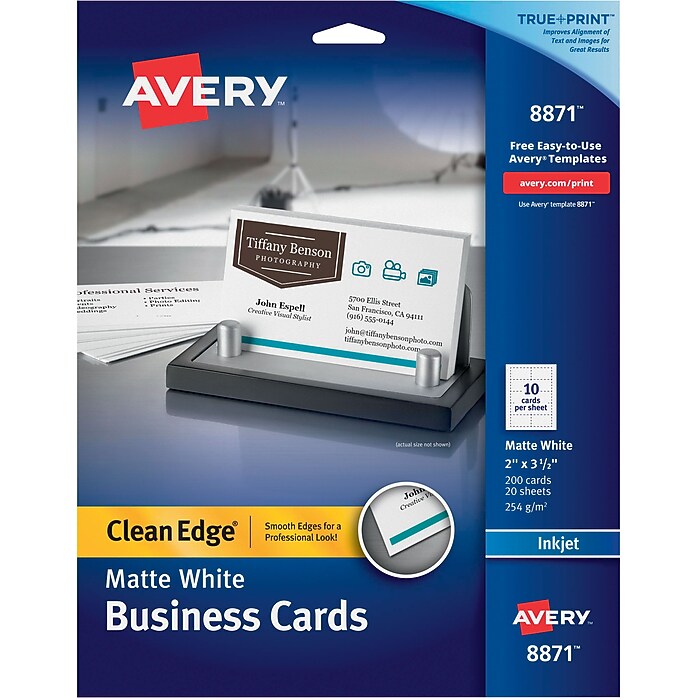
Avery Clean Edge 2-Side Printable Inkjet Business Cards, White, 2in. x 3 1/2in.,200/Pack

Avery® Clean Edge 2-Side Printable Inkjet Business Cards, White, 2" x 3 1/2",200/Pack

Item: 437177    Model: 08871

Avery® Clean Edge 2-Side Printable Inkjet Business Cards, White, 2" x 3 1/2",200/Pack
4.5stars
( 446 reviews)
  • 2" x 3 1/2" cards
  • White
  • Matte finish
See more details
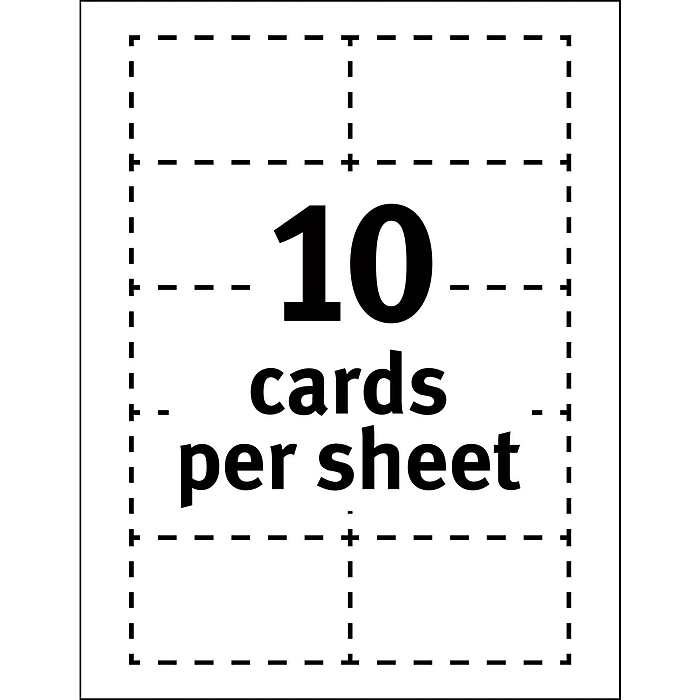
2" x 3 1/2" cardsAvailable in White and IvoryMatte finishSelect an Item2" x 3 1/2" cardsAvailable in White and IvoryMatte finishAvery® Clean-Edge 2-Side Printable Inkjet Business Cardshttp://s7d5.scene7.com/is/image/Staples/s0192461_sc7?$std$http://s7d5.scene7.com/is/image/Staples/s0192461_sc7?$thb$http://s7d5.scene7.com/is/image/Staples/s0192461http://s7d5.scene7.com/is/image/Staples/s0192460_sc7?$std$http://s7d5.scene7.com/is/image/Staples/s0192460_sc7?$thb$http://s7d5.scene7.com/is/image/Staples/s0192460/Avery-Clean-Edge-2-Side-Printable-Inkjet-Business-Cards/product_SS1033556Avery® Clean-Edge 2-Side Printable Inkjet Business Cards4.5446 2" x 3 1/2" cardsWhiteMatte finish200/Cards2" x 3 1/2" cardsWhiteMatte finishAvery® Clean Edge 2-Side Printable Inkjet Business Cards, White, 2" x 3 1/2",200/Packhttp://s7d5.scene7.com/is/image/Staples/s0278485_sc7?$std$http://s7d5.scene7.com/is/image/Staples/s0278485_sc7?$thb$http://s7d5.scene7.com/is/image/Staples/s0278485/Avery-Clean-Edge-2-Side-Printable-Inkjet-Business-Cards-White-2-inch/product_437177Avery® Clean Edge 2-Side Printable Inkjet Business Cards, White, 2" x 3 1/2",200/Pack4.5446 Ten 2" x 3 1/2" cards on an 8 1/2" x 11" sheet; 200 cards per packHigh quality, heavyweight cardstockIvory with matte finish - prints on both sides200/CardsTen 2" x 3 1/2" cards on an 8 1/2" x 11" sheet; 200 cards per packHigh quality, heavyweight cardstockIvory with matte finish - prints on both sidesAvery® Clean Edge Inkjet Business Cards, Ivory, 2" x 3 1/2"http://s7d5.scene7.com/is/image/Staples/s0278486_sc7?$std$http://s7d5.scene7.com/is/image/Staples/s0278486_sc7?$thb$http://s7d5.scene7.com/is/image/Staples/s0278486/Avery-Clean-Edge-Inkjet-Business-Cards-Ivory-2-inch-x-3-1/product_475348Avery® Clean Edge Inkjet Business Cards, Ivory, 2" x 3 1/2"4.5304
Price:
$12.99
200/Cards

Currently Out of Stock.

Add to Favorites


REVIEW SNAPSHOT®

by PowerReviews
Avery® Clean Edge 2-Side Printable Inkjet Business Cards, White, 2" x 3 1/2",200/Pack
 
4.4

(based on 447 reviews)

Ratings Distribution

  • 5 Stars


    (274)

  • 4 Stars


    (119)

  • 3 Stars


    (17)

  • 2 Stars


    (13)

  • 1 Stars


    (24)

90%

of respondents would recommend this to a friend.

Pros

  • Good value (177)
  • Easy to use (114)
  • Professional weight (107)
  • Bright (94)
  • Durable (93)

Cons

  • Jams (26)
  • Pricey / poor value (10)
  • Flimsy (6)
  • Difficult to install (5)
  • Rips easily (4)

Best Uses

  • Professional documents (47)
  • Black & white documents (35)
  • Color photos (34)
  • Photos and graphics (28)
  • Business cards (27)
    • Occupation::
    • Work from home (63), Business owner (55), Executive (17), IT professional (10), Assistant (7)
    • Reviewer Profile:
    • Quality oriented (122), Frequent user (100), Budget shopper (62), Infrequent user (40), Heavy duty user (17)
    • Primary use:
    • Business (253), Personal (92)

Most Helpful Positive Review


Very Professional Look

This product was very easy to use. I love that Avery has templates to choose from and designs if you can't come up with one of your own. The smooth edges make it look ...Read complete review

This product was very easy to use. I love that Avery has templates to choose from and designs if you can't come up with one of your own. The smooth edges make it look as if it was professionally printed.

VS

Most Helpful Negative Review


Printing bleeds into card.

I use these cards to promote a Lab Rescue group.
The ink bleeds and the finished product looks awful. These are the worst cards I have ever used. This has not happened with ...Read complete review

I use these cards to promote a Lab Rescue group.
The ink bleeds and the finished product looks awful. These are the worst cards I have ever used. This has not happened with other card stock.

Reviewed by 447 customers

Sort by

Displaying reviews 1-5

Back to top

Previous | Next »

 
4.0

good for business cards

By bev

from Sequim, WA

About Me Heavy Duty User

Verified Buyer

Pros

  • Doesn't Jam
  • Durable
  • Good Value
  • Professional Weight

Cons

    Best Uses

    • Professional Documents

    Comments about Avery® Clean Edge 2-Side Printable Inkjet Business Cards, White, 2" x 3 1/2",200/Pack:

    I had to change from glossy as it is no longer available from Avery in the template that I use so I wasn't sure it would work. It is great!

    • Primary use:
    • Business

    Comment on this review(earn points)

     
    4.0

    A tad expensive

    By aeneuman

    from ct

    About Me Frequent User

    Verified Buyer

    Pros

    • Bright
    • Doesn't Jam
    • Durable
    • Sharp Tones & Colors

    Cons

    • Pricey / Poor Value

    Best Uses

    • Graphics & Charts
    • Professional Documents

    Comments about Avery® Clean Edge 2-Side Printable Inkjet Business Cards, White, 2" x 3 1/2",200/Pack:

    Easy to use free Avery website allows you to create your own business card design

    • Primary use:
    • Business

    Comment on this review(earn points)

     
    4.0

    Fast Business Cards

    By old wire guy

    from Huntington Beach, CA

    About Me Frequent User

    Verified Buyer
    This customer has reached Intern level on the Staples.com Leaderboard

    Pros

    • Bright
    • Good Value

    Cons

    • Jams

    Best Uses

      Comments about Avery® Clean Edge 2-Side Printable Inkjet Business Cards, White, 2" x 3 1/2",200/Pack:

      On occasion, not often though, the cards jam in my HP printer. When they do jam, getting them out is a nightmare because they come apart at the perfs and clog up the internal mechanisms. The cards look good, take ink well, and don't smear. I would like a better template so that adding graphics is easier.

      • Primary use:
      • Business

      Comment on this review(earn points)

       
      3.0

      Not quite what I expected

      By Its me Charlie T.

      from Va

      About Me Heavy Duty User

      Verified Buyer

      Pros

      • Bright
      • Doesn't Jam
      • Professional Weight
      • Sharp Tones & Colors

      Cons

      • Edges Fray
      • Flimsy
      • Pricey / Poor Value

      Best Uses

      • Temporary Employee Card

      Comments about Avery® Clean Edge 2-Side Printable Inkjet Business Cards, White, 2" x 3 1/2",200/Pack:

      I needed a short term card for employees to use until their normal cards are made or to use for specialty projects. The top layer of the card has what seems to be tissue paper bonded to the card to let the ink jet absorb properly. This layer frays at the edges and will separate if you carry them in a wallet. You loose 20% of the cards tearing them apart if you care about this edge quality. You also cant carry them for a week without them looking bad. A good stop gap product for when you don't have a color laser printer and you need a color business card for a short amount of time.

      • Primary use:
      • Business

      Comment on this review(earn points)

       
      5.0

      Performs Flawlessly

      By BK

      from Temecula, CA

      About Me Heavy Duty User

      Verified Buyer

      Pros

      • Doesn't Jam
      • Durable
      • Good Value
      • Great Perforation
      • Ink does not run
      • Professional Weight
      • Sharp Tones & Colors

      Cons

        Best Uses

        • Business Cards

        Comments about Avery® Clean Edge 2-Side Printable Inkjet Business Cards, White, 2" x 3 1/2",200/Pack:

        I had used a couple other kind, but they did not cut the mustard. They were flimsy, ink bled through, single sided and various other issues.

        These does what they were intended to do and more. They are very durable and the ink comes out clean around the edges instead of looking torn and tattered around them.

        My wife is contemplating starting her chocolate business. She was going to order ready made business cards. I spoke with her about doing them herself thus allowing the possibility of saving money. She finally listened to me and here we are today with your product.

        I will continue to purchase these and make my own business cards for future use. When you find a product that works, stick with it!

        • Primary use:
        • Personal

        Comment on this review(earn points)

        Displaying reviews 1-5

        Back to top

        Previous | Next »

        Do you have questions about this product?(earn points for answers!)

        get answers from real customers and in-house experts with AnswerBox.

        3 Questions | 10 Answers
        Displaying questions 1-3
        • Q:

          are there business cards compatible with the canon mx410 inkjet printer. That is the printer I have, and I need to know if im buying the right cards. If these aren't the right kind, could you please tell me which ones are? Thank you.
          Asked on 8/19/2011 by Anonymous

          1 answer

          • CUSTOMER CARE

            A:

            This product should work fine with your Canon inkjet printer. Just be sure to change your printer settings so that your printer will know you're printing on a heavier paper. To place an order for this item, please contact us at 1-800-333-3330.

            Answered on 8/24/2011 by Liz C from Staples
        • Q:

          What is the difference between plain white and matte finish white. Which one is "shinier"?
          Asked on 4/30/2011 by Anonymous

          1 answer

          • CUSTOMER CARE

            A:

            Neither matte nor plain white finish will have a shiny finish. Matte finish is designed to reduce shine. If you are looking for a product with a shine, it would be necessary to purchase a product with a glossy finish.

            Answered on 5/4/2011 by Liz C from Staples
        • Q:

          Can I use an HP Officejet printer with this product?
          Asked on 9/10/2009 by Joan from Charlottesville, VA

          8 answers

          • VERIFIED BUYER

            A:

            There should not be any restrictions for a properly working printer or all-in-one regardless of brand or model.

            Answered on 9/23/2009 by Sam @ Metro Promo from Blue Ash, OH (Cincinnati)
          • VERIFIED BUYER

            A:

            Yes. I'm using an HP Deskjet F335 to print my cards.

            Answered on 9/29/2009 by Johnny from West Michigan
          • VERIFIED BUYER

            A:

            Yes; works well on 3 different HP printers for me (1 laser 1010 and 2 all-in-one print jets, 7310, 8500) including color accuracy. As with any high quality color print, check your ink cartridges fill levels. My experience over the years has been that HP works well in general with all the Avery products.

            Answered on 10/20/2009 by Gator from Benicia
          • VERIFIED BUYER

            A:

            Yes, I have an HP Office-jet Pro 8500 wireless. and it works perfect, except some of the colors don't match real life color. I also use a HP all in one Printer C5580 and it's color is perfect every time.

            Answered on 12/8/2009 by The Bear from Jefferson, Oregon
          • VERIFIED BUYER

            A:

            Absolutely. That is what I used. Set the printer properties to show that you are using card stock to avoid jams. I use an older HP Officejet so I feed one page at a time, but that shouldn't be necessary if yours is a newer model and you have set the printer properties.

            Answered on 12/8/2009 by DD from Oak Ridge, TN
          • VERIFIED BUYER

            A:

            Yes, put them in the bypass tray

            Answered on 12/9/2009 by Melissa from Escanaba MI
          • VERIFIED BUYER

            A:

            Yes, you can use any quality printer with these.

            Answered on 1/5/2010 by Tom the Candleman from Lehigh Acres, Florida
          • VERIFIED BUYER

            A:

            Yes you can.. This is for inkjet printers

            Answered on 1/19/2010 by Rich from Brighton Michigan
        Displaying questions 1-3

        Do you have a question about this product?