Facebook Twitter YouTube LinkedIn
  • Welcome, Log in please.
  • Free shipping on staples.com for Rewards members.
Skip Navigation
Ink Toner Finder

Ink & Toner Finder:

  • Cartridge Number
    • Cartridge Number
    • Printer Model #
Weekly Ad
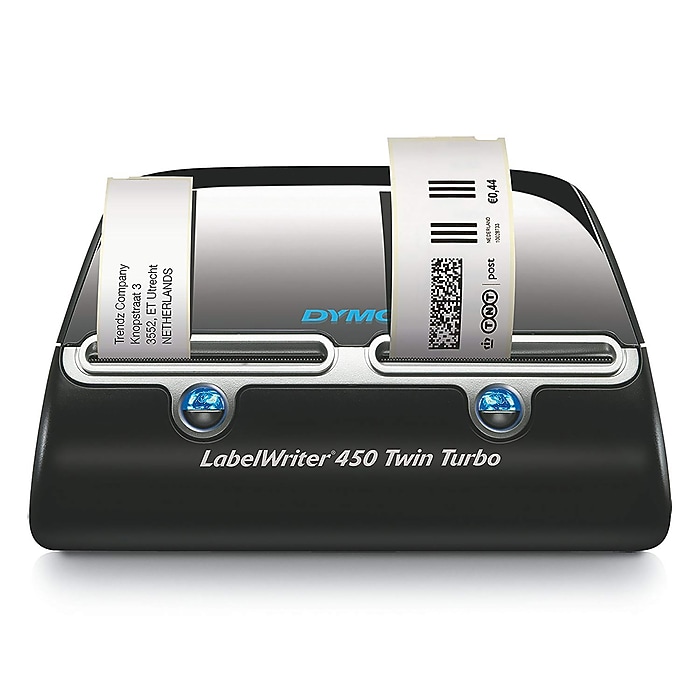
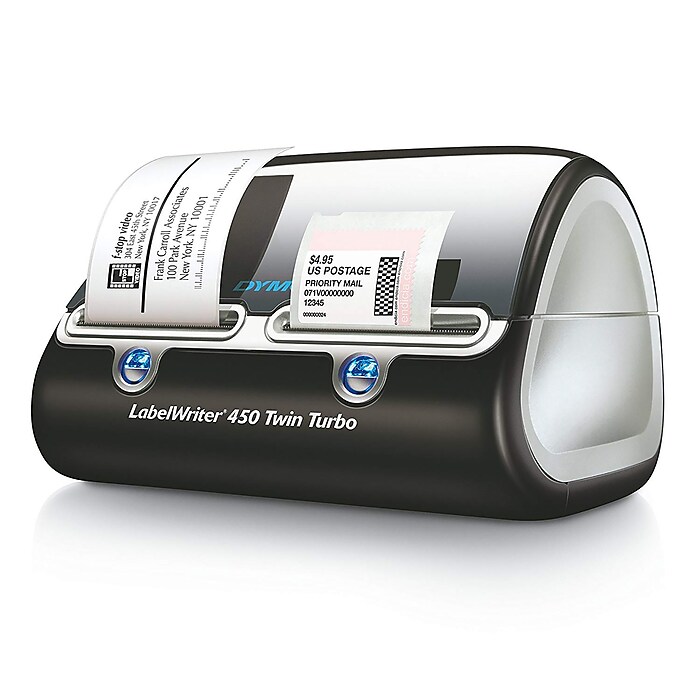
DYMO LabelWriter 450 Twin Turbo Label Printer

DYMO® LabelWriter 450 Twin Turbo Label Printer

Item: 796637    Model: 1752266

DYMO® LabelWriter 450 Twin Turbo Label Printer
4.5stars
( 82 reviews)
Prints up to 71 labels per minuteHolds two label rolls at oncePrints up to 2.3" labelsEachLabelWriter 450 Twin Turbo Label PrinterDYMO® LabelWriter 450 Twin Turbo Label Printerhttp://s7d5.scene7.com/is/image/Staples/s0338047_sc7?$std$http://s7d5.scene7.com/is/image/Staples/s0338047_sc7?$thb$http://s7d5.scene7.com/is/image/Staples/s0338047/DYMO-LabelWriter-450-Twin-Turbo-Label-Printer/product_796637DYMO® LabelWriter 450 Twin Turbo Label Printer4.582
Price:
$199.99
Each

Currently Out of Stock.

Add to Favorites


REVIEW SNAPSHOT®

by PowerReviews
DYMO® LabelWriter 450 Twin Turbo Label Printer
 
4.5

(based on 82 reviews)

Ratings Distribution

  • 5 Stars


    (50)

  • 4 Stars


    (27)

  • 3 Stars


    (2)

  • 2 Stars


    (0)

  • 1 Stars


    (3)

95%

of respondents would recommend this to a friend.

Pros

  • Easy to use (41)
  • Fast print time (39)
  • Easy to set up (36)
  • Works quickly (34)
  • Simple controls (29)

Cons

  • Jams easily (7)
  • Flimsy construction (3)

Best Uses

  • Address printing (33)
  • Filing (20)
  • Black & white documents (19)
  • Stamps (7)
  • Electronics (5)
    • Occupation::
    • Business owner (10), Office manager (7), Work from home (7), Executive (6), IT professional (3)
    • Reviewer Profile:
    • Frequent user (35), Quality oriented (19), Budget shopper (14), Infrequent user (6), Heavy duty user (5)
    • Primary use:
    • Business (56), Personal (25)

Most Liked Positive Review


Super handy label printer!

This is one of the slickest little units I've seen in a long time. Here are just a few of the things I like about it:

* It can hold two differen...Read complete review

This is one of the slickest little units I've seen in a long time. Here are just a few of the things I like about it:

* It can hold two different sizes of labels, so you don't have to switch out the rolls if you use, say, a regular-size address label and a larger shipping label.

* The thermal labels work great - no ink or toner, nothing to buy but blank labels.

* The DYMO software is excellent and easy to use. In no time, I was designing, saving, and printing labels, complete with my company logo and USPS-approved barcode. I imported my customer database right into the label software and printed about 550 labels in less than 8 minutes. The speed is really amazing - less than one second per label!

* Address verification and correction is built into the software. This feature checks the address against the USPS database, makes corrections, and adds ZIP+4 as needed. Slick!

All in all, I will get a lot of use out of this unit. I recommend it highly!

VS

Most Liked Negative Review


Product Fatally Flawed

Bought on strength of reviews and returned product after 1 use.Reason: Each label retracts 1/4" back into device prior to printing, in order to "reset the printer head," a...Read complete review

Bought on strength of reviews and returned product after 1 use.Reason: Each label retracts 1/4" back into device prior to printing, in order to "reset the printer head," as tech support explained. Problem is that in doing so the labels on the strip catch on the serrated teeth in the slot, causing a loud snapping sound which also puts teeth marks on the label's edge. Tech support said this was the machine's m.o. and not to worry. Unfortunately, as I attempted to tear the label strip off the machine, the edge caught on the teeth as it retracted and jammed, glue-side down, inside the slot. When I lifted the front cover to clear the jam, the postage labels took off running from the other slot and I had to unplug the machine--all this while on a call to tech support. I was then told to remove the front cover to un-feed the jam. This turned out to be a real chore, as the levers designed to do this are flimsy and resistant and the labels stick inside the slot--not fun. These design flaws are fatal.

Reviewed by 82 customers

Sort by

Displaying reviews 1-6

Back to top

Previous | Next »

(13 of 21 customers found this review helpful)

 
1.0

Product Fatally Flawed

By Colin

from Glendale, CA

About Me Quality Oriented

Verified Buyer

Pros

  • Works Quickly

Cons

  • Complicated Controls
  • Difficult to Peel
  • Flimsy
  • Jams Easily
  • Loud

Best Uses

  • Address Printing

Comments about DYMO® LabelWriter 450 Twin Turbo Label Printer:

Bought on strength of reviews and returned product after 1 use.Reason: Each label retracts 1/4" back into device prior to printing, in order to "reset the printer head," as tech support explained. Problem is that in doing so the labels on the strip catch on the serrated teeth in the slot, causing a loud snapping sound which also puts teeth marks on the label's edge. Tech support said this was the machine's m.o. and not to worry. Unfortunately, as I attempted to tear the label strip off the machine, the edge caught on the teeth as it retracted and jammed, glue-side down, inside the slot. When I lifted the front cover to clear the jam, the postage labels took off running from the other slot and I had to unplug the machine--all this while on a call to tech support. I was then told to remove the front cover to un-feed the jam. This turned out to be a real chore, as the levers designed to do this are flimsy and resistant and the labels stick inside the slot--not fun. These design flaws are fatal.

  • Occupation::
  • Business Owner
  • Primary use:
  • Business

Comment on this review(earn points)

(6 of 6 customers found this review helpful)

 
5.0

Works perfectly

By Marty

from Lake Forest, CA

About Me Quality Oriented

Verified Buyer

Pros

  • Durable
  • Neat Settings
  • Quiet
  • Simple Controls
  • Strong Labels
  • Works Quickly

Cons

    Best Uses

    • Address Printing

    Comments about DYMO® LabelWriter 450 Twin Turbo Label Printer:

    Very easy to build address lists. Software interface, great job. I still have the previous models (315, 330, 400). I like the space saving aspect and two printers on one USB port.

    • Occupation::
    • Business Owner
    • Primary use:
    • Business

    Comment on this review(earn points)

    (4 of 4 customers found this review helpful)

     
    5.0

    Dymo LabelWriter The Best

    By jim

    from westwood, ma

    About Me Quality Oriented

    Verified Buyer

    Pros

    • Quiet
    • Simple Controls
    • Works Quickly

    Cons

      Best Uses

      • Address Printing
      • Filing

      Comments about DYMO® LabelWriter 450 Twin Turbo Label Printer:

      Use for both envelopes and folders without the need to change rolls. This saves a lot of time.

      • Occupation::
      • Executive
      • Primary use:
      • Business

      Comment on this review(earn points)

      (4 of 4 customers found this review helpful)

       
      5.0

      Great product, makes my job easier!

      By Connie

      from Lansing, MI

      About Me Quality Oriented

      Verified Buyer

      Pros

      • Durable
      • Neat Settings
      • Quiet
      • Simple Controls
      • Strong Labels
      • Works Quickly

      Cons

        Best Uses

        • Address Printing
        • Filing

        Comments about DYMO® LabelWriter 450 Twin Turbo Label Printer:

        I use Dymo Labeler for addressing envelopes and label files, makes everything look professional.

        • Occupation::
        • Office Manager
        • Primary use:
        • Business

        Comment on this review(earn points)

        (3 of 3 customers found this review helpful)

         
        5.0

        Two are Definitely Better Than One

        By Splash

        from Norwalk, CT

        About Me Quality Oriented

        Verified Buyer

        Pros

        • Durable
        • Quiet
        • Simple Controls
        • Strong Labels
        • Works Quickly

        Cons

          Best Uses

          • Address Printing
          • Electronics
          • Filing
          • In The Kitchen
          • Toys

          Comments about DYMO® LabelWriter 450 Twin Turbo Label Printer:

          Having the two rolls of labels side by side saves a lot of time and aggravation. Keep the stamps on one side and use the other for everything else.

          • Occupation::
          • Executive
          • Primary use:
          • Personal

          Comment on this review(earn points)

          (3 of 3 customers found this review helpful)

           
          5.0

          One printer 2 lables

          By snowman

          from Barre,Vermont

          About Me Quality Oriented

          Verified Buyer

          Pros

          • Durable
          • Quiet
          • Simple Controls
          • Works Quickly

          Cons

          • None

          Best Uses

          • Address Printing
          • Electronics
          • Filing
          • In The Kitchen
          • Stamps

          Comments about DYMO® LabelWriter 450 Twin Turbo Label Printer:

          this is so much easyer than switching lables evertime you whant to do postage.
          one side lables the other for stamps

          • Occupation::
          • Work From Home
          • Primary use:
          • Personal

          Comment on this review(earn points)

          Displaying reviews 1-6

          Back to top

          Previous | Next »

          Do you have questions about this product?(earn points for answers!)

          get answers from real customers and in-house experts with AnswerBox.

          31 Questions | 37 Answers
          Displaying questions 1-10Previous | Next »
          • Q:

            I have a Dymo LabelWriter 330 Turbo. Will the 450 Twin Turbo use the existing list that I have or will I have to add the labels again?
            Asked on 3/9/2013 by JohnP

            1 answer

            • A:

              Save the address list to something other than default location. When you install the new label maker, select that location as your address book. Your address list will show up automatically.

              Answered on 3/10/2013 by Community Answer from None
          • Q:

            Will this work with Windows 8?
            Asked on 1/24/2013 by Anonymous

            1 answer

            • A:

              The 450 Twin Turbo will work with Windows 8. If the installation disc has not yet been updated to include Windows 8 printer drivers, updated drivers are available on the Dymo website.

              Answered on 1/24/2013 by Community Answer from None
          • Q:

            Is the DYMO LabelWriter 450 compatible with the USPS Intelligent Mail Barcode because all images of the DYMO seem to show the old POSTNET barcode?

            Also, I'd prefer not to export my database into an address list with the DYMO software. If I make changes to an address within my database, I don't want to then have to make changes in the DYMO software too. Is there a possible way for my database and DYMO to communicate and update simultaneously? My company uses GiftWorks Premium 2013.
            Asked on 12/11/2012 by TLee

            1 answer

            • CUSTOMER CARE

              A:

              Yes, for item 796637, the Intelligent Mail barcode is now used by the USPS instead of the POSTNET barcode to represent the nine-digit (ZIP+4) code on your labels. You would be able to only update your database and then you select the correct size and style for label, as well as the information that will go onto the label.

              Answered on 12/13/2012 by Christina.M from Staples
          • Q:

            Are third party labels available that can be used with this label printer - e.g., Staples or Avery brand labels, or are you required to use DYMO brand labels only?
            Asked on 6/22/2012 by Cheffy

            1 answer

            • A:

              Yes, there are quite a few third party labels that make DYMO compatible labels. The site labelvalue.com has a good assortment that is compatible with the DYMO LabelWriter 450 as well as other DYMO label printers.

              Answered on 6/22/2012 by Community Answer from None
          • Q:

            Will the Dymo 450 Twin Turbo work with a Mac 10.6.8 operating system?
            Asked on 3/10/2012 by JJ from Gloucester, MA

            2 answers

            • CUSTOMER CARE

              A:

              Yes, the above has USB connection to PC or Mac.

              Answered on 3/12/2012 by Christina.M from Staples
            • A:

              The DYMO LabelWriter 450 Twin Turbo Label Printer works with either Windows or Mac computers.

              Answered on 3/13/2012 by Community Answer from None
          • Q:

            Does this product come with lables or do I have to order them when I order online?
            Asked on 2/17/2012 by Anonymous

            1 answer

            • A:

              Included with the DYMO LabelWriter 450 Twin Turbo Label Printer are the power cords, USB cable, software, instructions, and starter labels.

              Answered on 2/21/2012 by Community Answer from None
          • Q:

            I have a eBay store can I print postage and shipping labels direct to this printer from eBay? Thanks
            Asked on 12/18/2011 by Anonymous

            1 answer

            • CUSTOMER CARE

              A:

              I received your inquiry through the Question and Answer Feature of Staples.com and I apologize for I was unable to answer you directly. I believe this may be a question that the manufacturer will have to research further, please feel free to contact Dymo at 1-800-426-7827.

              Answered on 1/11/2012 by Cara B from Staples
          • Q:

            Does the Dymo Labelwriter 450 Twin Turbo Label Printer print pedeflex labels.
            Asked on 7/21/2011 by Nancy from DCC

            1 answer

            • A:

              Yes, the label printer can print pedeflex labels.

              Answered on 7/25/2011 by Anonymous from None
          • Q:

            Is there an ink cartridge that needs to (eventually) be replaced?
            Asked on 4/5/2011 by Anonymous

            1 answer

            • CUSTOMER CARE

              A:

              This label printer uses a thermal printhead and heat sensitive labels. There are no ink, toner, or ribbon cartridges to replace. If you would like assistance with placing an order, please contact us at 800-333-3330.

              Answered on 4/12/2011 by Renee L from Staples
          • Q:

            Can this product be shared by 2 computers using a USB peripheral switch?
            Asked on 2/18/2011 by Anonymous

            1 answer

            • CUSTOMER CARE

              A:

              Yes, that would work.

              Answered on 2/23/2011 by Ally from Staples
          Displaying questions 1-10Previous | Next »

          Do you have a question about this product? 

          Dymo USPS Postage Stamps for LabelWriter Printers
          Item: 800776
          Model: 30915

          Dymo USPS Postage Stamps for LabelWriter Printers

          Reviews for Dymo USPS Postage Stamps for LabelWriter Printers
          4.5stars
          (18 reviews)
          • Print First-Class Mail®, Flat Rate Priority Mail® and more
          • 1 5/8" x 1 1/4" labels
          • 200 per roll
          Price:
          $22.49
          Roll
          Staples® Open-End Bubble Mailers, #1, 7-1/8in. x 11in.
          Item: 630758
          Model: B854

          Staples® Open-End Bubble Mailers, #1, 7-1/8in. x 11in.

          • #1, 7-1/8" x 11"
          • Seal with heat, tape or staples
          • Lined with 3/16" bubble cushioning to ship fragile items safely
          •  Recycled
          Price:
          $37.49
          100/Pack
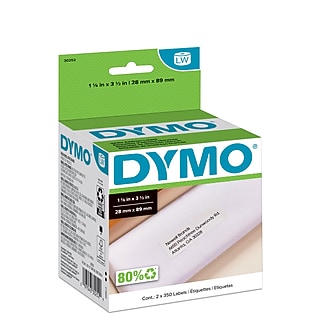
          DYMO LabelWriter Address Labels, 1-1/8in. x 3-1/2in., White
          Item: 377179
          Model: 30252

          DYMO LabelWriter Address Labels, 1-1/8in. x 3-1/2in., White

          Reviews for DYMO LabelWriter Address Labels, 1-1/8" x 3-1/2", White
          4.5stars
          (34 reviews)
          • For use with Dymo LabelWriter EL40, EL60, Turbo.
          • Each roll contains 350 labels
          Price:
          $25.99
          2 Rolls
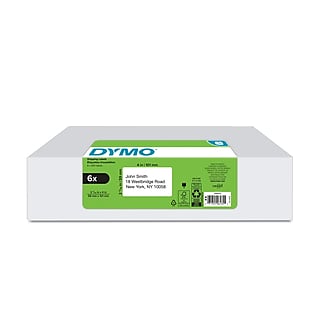
          DYMO LabelWriter Large White Shipping Labels, 2-5/16in. x 4in.
          Item: 377181
          Model: 30256

          DYMO LabelWriter Large White Shipping Labels, 2-5/16in. x 4in.

          Reviews for DYMO LabelWriter Large White Shipping Labels, 2-5/16" x 4"
          4.5stars
          (24 reviews)
          • For use with Dymo LabelWriter EL60, Turbo, 320, 330 and 330 Turbo.
          • 300 labels per roll
          Price:
          $25.99
          300/roll