Mechanical Keyboards With Arrow Keys

49 results
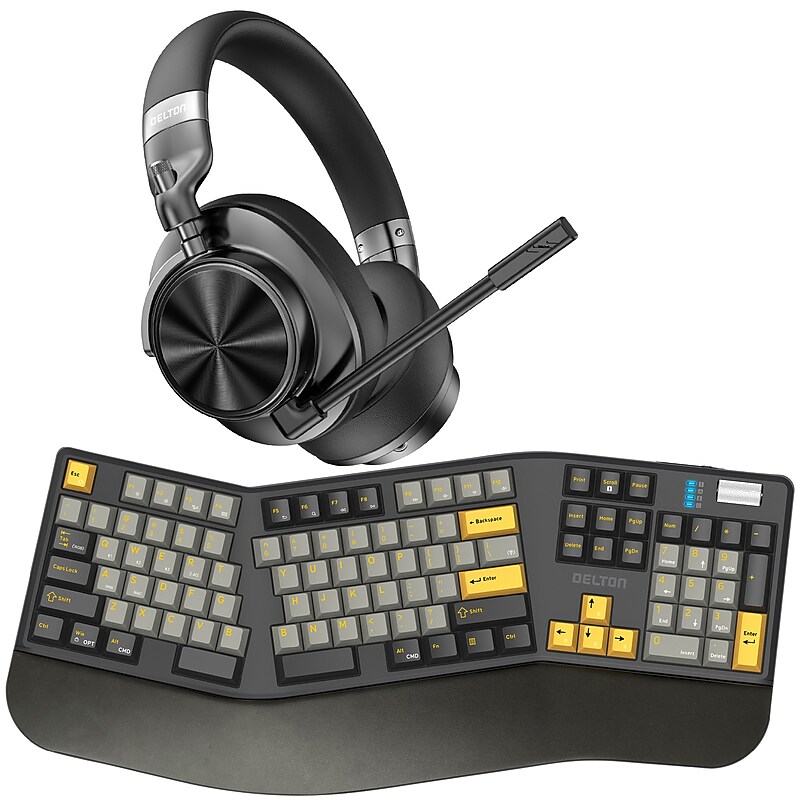
Delton E450 Ergonomic Mechanical Keyboard and Headset Bundle, Black (DKWE450WRBD1) image 1
Item: 24649493
Model: DKWE450WRBD1

Tackle your day with the Delton Wireless Ergonomic Keyboard and ANC Headset Bundle, built for professionals, educators, and hybrid workers who demand comfort, clarity, and seamless connectivity. The split ergonomic wireless keyboard features a sculpted layout, mechanical switches, and tri-mode input including Bluetooth, USB-C, and 2.4G wireless for smooth device switching. The Hi-Fi headset delivers powerful over ear noise cancelling headphones performance with hybrid ANC, four tuned mics, and a detachable boom mic for crystal-clear calls. Enjoy up to 100 hours of battery life, fast USB-C charging, and all-day wearability with memory foam ear cushions and a padded headband. Designed for comfort and control, this bundle is the ultimate upgrade for your work headset with mic needs at home or in the office..Stay comfortable with a fully split ergonomic keyboard featuring sculpted keycaps and tilt-adjustable feet, and a rheumatologist-recommended design for comfort..Power through the week with wireless headphones offering up to 100 hours of use, 84 hours of talk time, and fast USB-C charging in just 2 hours..Stay focused with noise cancelling headphones that combine hybrid ANC, four tuned mics, CVC 8.0, DSP, ENC, and a detachable boom mic for up to 60 hours of distraction-free use..Switch devices easily with 2.4G, Bluetooth, and USB-C keyboard modes and Bluetooth headphones supporting dongle, Bluetooth, and 3.5mm wired input..Enjoy rich, detailed sound with Hi-Fi 40mm drivers in headphones with microphone, perfect for calls, content, and music..Type with speed and precision using a 104-key layout, 105 keycaps, and hot-swappable switches that define a high-performance mechanical keyboard..Stay in control with a dedicated volume dial, intuitive media shortcuts, and a keyboard wireless range up to 30 feet for unrestricted workflow..Customize and maintain your USB keyboard with the included key puller, switch tool, and spare membrane keys..Stay comfortable anywhere with foldable over ear headphones featuring memory foam cushions, swivel ear cups, and a padded headband..Move freely with a 30 ft wireless range on your wireless headset with mic, perfect for multitasking around your space..Work without interruptions thanks to a 40-hour keyboard battery, 8-hour recharge time, and low battery indicator..Fit your space with a 19.71-inch wide keyboard weighing just 1.8 pounds, built for both stability and portability..Connect across platforms using any major OS or device that supports computer keyboards..Run every meeting smoothly with a Bluetooth keyboard and headset bundle fully compatible with Zoom, Teams, Meet, Slack, and more..Tackle any environment with a versatile setup built for home, office, and hybrid work: trusted by remote pros, educators, and high-performers alike..1-year manufacturer limited warranty..Included in the Package: keyboard, charging cable, 2-In-1 shaft and key, extractor, switch 3X, headset, USB dongle, USB-C charging cable, 35mm audio cable, microphone, & user manual.⚠ WARNING: Cancer and Reproductive Harm - www.P65Warnings.ca.gov.No Stress. No Limits. Just a Seamless wireless ergonomic keyboard and headset with mic built for focus, flow, and freedom.

Price is  $312.49
1
2
3
4
5
6
7
8
9
10
11
12
13
14
15
16
17
18
19
20
21
22
23
24
25
26
27
28
29
30
Over 30
Add to list
No reviews yet

About Mechanical Keyboards with Arrow Keys

Mechanical keyboards with arrow keys are designed to provide a tactile and responsive typing experience, making them a popular choice for gamers, programmers, and typists alike. These keyboards feature individual mechanical switches for each key, allowing for precise keystrokes and enhanced durability compared to traditional membrane keyboards.

Incorporating dedicated arrow keys, these mechanical keyboards facilitate easy navigation and control, which is essential for both gaming and productivity tasks. Their ergonomic designs often include features like adjustable heights and customizable backlighting, catering to user comfort and aesthetic preferences.

When choosing a mechanical keyboard with arrow keys, consider the type of mechanical switches used, as they can significantly affect the feel and sound of each keystroke. Options range from tactile and clicky switches for feedback to linear switches for a smoother typing experience, allowing users to select based on personal preference.

Additionally, look for features such as programmable keys, customizable RGB lighting, and robust build quality. These elements enhance functionality and personalization, ensuring that your keyboard meets your specific needs, whether for gaming, coding, or general use.

What are mechanical keyboards with arrow keys?

  • Mechanical keyboards with arrow keys are keyboards that utilize individual mechanical switches for each key, including dedicated arrow keys for navigation. They are known for their durability and tactile feedback, making them ideal for various applications.

Why should I choose a mechanical keyboard?

  • Mechanical keyboards offer a superior typing experience due to their tactile feedback and durability. They are often preferred by gamers and professionals for their responsiveness and the ability to withstand heavy use over time.

What types of mechanical switches are available?

  • Mechanical switches come in several types, including tactile, clicky, and linear. Each type provides a different feel and sound, allowing users to choose based on their typing style and preferences.

Are mechanical keyboards with arrow keys good for gaming?

  • Yes, mechanical keyboards with arrow keys are excellent for gaming due to their fast response times and customizable features. The dedicated arrow keys allow for precise movement and control in games, enhancing overall performance.

Can I customize the lighting on mechanical keyboards?

  • Many mechanical keyboards come with customizable RGB lighting options, allowing users to personalize their keyboard's appearance. This feature can enhance the gaming experience and add a unique touch to your workspace.

How do I choose the right mechanical keyboard for my needs?

  • Consider factors such as switch type, build quality, and additional features like programmable keys and backlighting. Assess your primary use—whether for gaming, typing, or both—to find a keyboard that best suits your requirements.