Solid State Drive for Backup

145 results
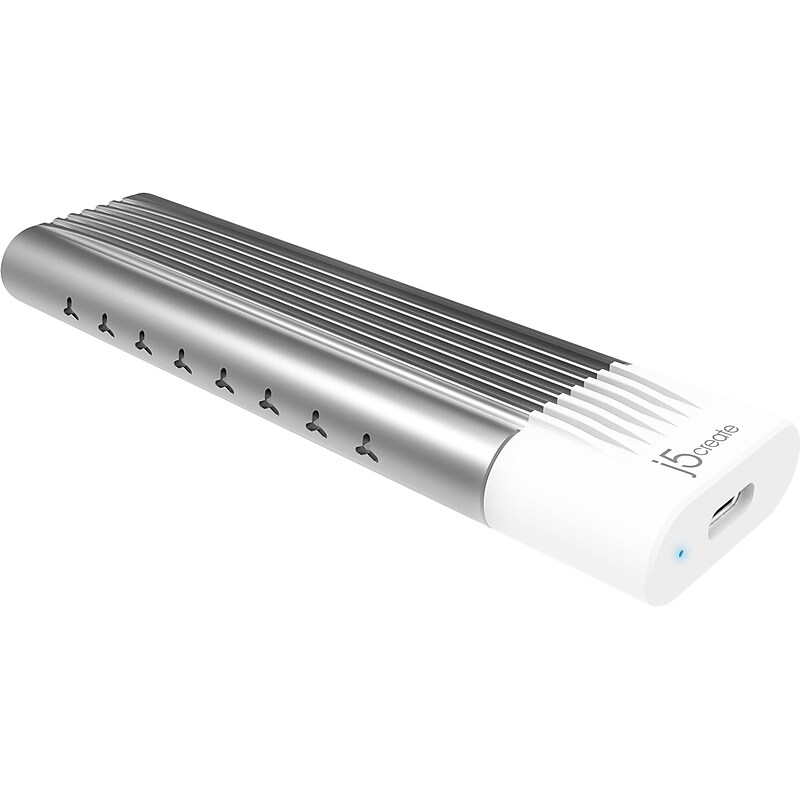
j5create M.2 USB 3.1 External PCIe NVMe Hard Drive Enclosure, SSD, Silver/White (JEE256) image 1
Item: 24572590
Model: JEE256

The j5create USB Type-C to M.2 NVMe SSD enclosure easily connects the M.2 NVMe SSD to a USB Type-C or Thunderbolt 3 PC for file backup, disk upgrade, disk cloning, data recovery, and storage expansion. Compatible with four different sizes: M.2 NVMe SSD 2230/2242/2260/2280 (M key) solid-state drivers. Provides superfast (up to 900Mbps) read and write speed. Perfect for PCs with no M.2 socket available. Quick and easy installation: just use the included rubber fasteners to secure your M.2 SSD drive onto the board, no need for screws and screwdrivers. The case is made of smooth aluminum for heat dissipation. The aluminum shell has two side vent holes that are designed to enhance the cooling effect. With a blue LED indicator, you can easily see the status of the case. A constant light indicates device connection, and a flashing light indicates data transmission. Compatible with Windows, macOS, Linux, and ChromeOS. Plug and play, no driver required. A perfect companion for your laptop while on the go. Includes a USB Type-C cable..USB Type-C to M.2 NVMe SSD enclosure easily connects the M.2 NVMe SSD to a USB Type-C or Thunderbolt 3 PC for file backup, disk upgrade, disk cloning, data recovery, and storage expansion.Compatible with four different sizes: M.2 NVMe SSD 2230/2242/2260/2280 (M key) solid-state drivers.Supports NVMe SSD and is compatible with USB Type-C or Thunderbolt 3 USB 3.1 Gen 2 with 10Gbps speeds.Made of aluminum in a silver-tone finish and white plastic.Rubber retention peg can be adjusted to match any kind of M.2 NVMe SSD.Provides superfast (up to 900Mbps) read and write speed.Compatible with Windows, macOS, Linux, and ChromeOS.Plug-and-play installation with no driver required.Box contains: enclosure, USB Type-C to USB Type-C cable (0.98'), quick installation guide.2-year manufacturer limited warranty.WARNING: Cancer and Reproductive Harm - www.P65Warnings.ca.gov

Price is  $57.99
1
2
3
4
5
6
7
8
9
10
11
12
13
14
15
16
17
18
19
20
21
22
23
24
25
26
27
28
29
30
Over 30
Add to list
2

About Solid State Drive for Backup

Solid state drives (SSDs) for backup are essential storage solutions designed to securely store and protect your important data. Unlike traditional hard drives, SSDs utilize flash memory technology, providing faster data access speeds, improved reliability, and enhanced durability, making them ideal for backup purposes.

These drives are compact, lightweight, and often feature USB connectivity, allowing for easy portability and quick data transfer. With their ability to withstand shocks and vibrations, SSDs are perfect for users who need reliable backup options for both personal and professional use.

When choosing a solid state drive for backup, consider factors such as storage capacity, read and write speeds, and connectivity options. Many models offer capacities ranging from 500GB to several terabytes, ensuring ample space for all your backup needs.

Additionally, look for features like encryption for data security, rugged designs for enhanced durability, and compatibility with various operating systems. These features ensure that your data remains safe and accessible, providing peace of mind for users who prioritize data protection.

What is a solid state drive for backup?

  • A solid state drive for backup is a storage device that uses flash memory to store data securely. It is designed to provide fast access speeds and reliable data protection for personal and professional files.

Why should I use an SSD for backup instead of an HDD?

  • SSDs offer faster data transfer speeds, greater durability, and lower power consumption compared to traditional hard disk drives (HDDs). This makes them a more efficient and reliable option for backing up important data.

How much storage do I need for a backup SSD?

  • The required storage capacity depends on the amount of data you need to back up. For general use, a drive with at least 1TB of storage is recommended, while larger capacities may be necessary for extensive data collections.

Are solid state drives for backup portable?

  • Yes, many solid state drives are designed to be portable, featuring lightweight and compact designs. This allows users to easily carry them for on-the-go backups and data transfers.

Can I use an SSD for both backup and regular storage?

  • Absolutely! Solid state drives can be used for both backup and regular storage, providing fast access to files and applications. They are versatile enough to handle various data storage needs.

Do SSDs require special maintenance for backup purposes?

  • Generally, SSDs do not require extensive maintenance. However, it's important to keep the firmware updated and to periodically check the drive's health to ensure optimal performance and data integrity.