VESA Bracket Adapters

97 results
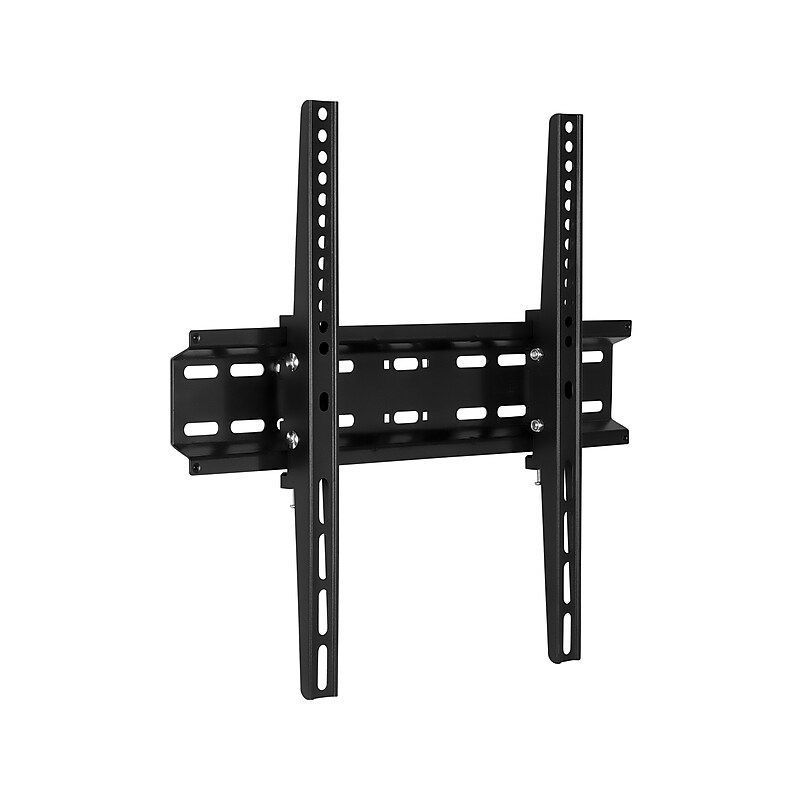
Mount-It! Tilt Wall TV Mount for LCD TV, Screen Size: up to 55", 77 lbs. Max. (MI-3030) image 1
Item: 24476972
Model: MI-3030

The Mount-It! TV mount combines the best of both worlds with a sleek minimal design and a functional tilt adjustment to create a better viewing experience. Its heavy-duty steel construction safely and securely mounts your TV on the wall with a load capacity of up to 77 lbs. The mount features an integrated safety screw locking system for added security, giving you even more confidence when mounting your TV on the wall..TV mount combines the best of both worlds with a sleek minimal design and a functional tilt adjustment to create a better viewing experience.Fits TVs with VESA patterns from 200 x 200mm to 400 x 400mm and screens up to 55"; holds up to 77 lbs..Comes in black and made of heavy-duty steel.Low-profile design keeps your TV under 2" from the wall.Keep your TV secure with integrated safety screw locking system.Tilt: 10 degrees down/5 degrees up.Package includes: wall mount, installation hardware, easy-to-follow installation instructions.Supported by manufacturer's limited lifetime warranty

Price is  $24.99
1
2
3
4
5
6
7
8
9
10
11
12
13
14
15
16
17
18
19
20
21
22
23
24
25
26
27
28
29
30
Over 30
Add to list
No reviews yet

About VESA Bracket Adapters

VESA bracket adapters are essential accessories that enable the mounting of monitors and TVs to various wall mounts and stands. Designed to conform to the VESA (Video Electronics Standards Association) mounting specifications, these adapters ensure compatibility between different devices and mounting solutions.

These adapters provide flexibility in mounting options, allowing users to securely attach their screens in a way that best suits their space and viewing preferences. Whether for home entertainment systems or professional workstations, VESA bracket adapters facilitate optimal screen positioning and stability.

When selecting VESA bracket adapters, consider factors such as weight capacity, compatibility with your device's VESA pattern, and the material quality of the adapter. It's crucial to ensure that the adapter can support the weight of your monitor or TV while providing a secure fit to the mount.

Additionally, look for adapters that offer easy installation and adjustment features. Some models may include tilt or swivel capabilities, allowing for enhanced viewing angles and comfort, making them a valuable addition to any setup.

What are VESA bracket adapters used for?

  • VESA bracket adapters are used to connect monitors and TVs to various mounting solutions, ensuring compatibility and secure attachment. They allow for flexible mounting options in both home and office environments.

How do I know if my monitor is VESA compatible?

  • To determine if your monitor is VESA compatible, check the user manual or look for mounting holes on the back of the monitor. The distance between these holes typically follows standard VESA measurements, such as 75x75mm or 100x100mm.

Can I use VESA adapters for any type of monitor?

  • Most VESA adapters are designed to work with a wide range of monitors, but it's essential to ensure that the adapter matches the VESA pattern and weight capacity of your specific monitor model for safe use.

Are VESA bracket adapters easy to install?

  • Yes, VESA bracket adapters are generally designed for easy installation, often including all necessary hardware and clear instructions. Most users can complete the setup with basic tools in a short amount of time.

What should I consider when choosing a VESA bracket adapter?

  • When choosing a VESA bracket adapter, consider the weight capacity, compatibility with your monitor's VESA pattern, and the material quality. Additionally, look for features like tilt or swivel adjustments for improved viewing angles.

Do VESA adapters come in different sizes?

  • Yes, VESA adapters come in various sizes to accommodate different VESA patterns and monitor sizes. It's important to select an adapter that matches the specific dimensions of your monitor for optimal performance.