Facebook Twitter YouTube LinkedIn
  • Welcome, Log in please.
  • Free shipping on staples.com for Rewards members.
Skip Navigation
Ink Toner Finder

Ink & Toner Finder:

  • Cartridge Number
    • Cartridge Number
    • Printer Model #
Weekly Ad
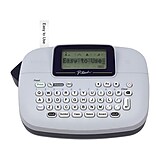
Brother P-touch PT-1090 Label Maker

Brother® P-touch® PT-1090 Label Maker

Item: 812522    Model: PT1090

Brother® P-touch® PT-1090 Label Maker
4.0stars
( 201 reviews)
  • 12 Deco Mode Patterns for extra-stylish labels
  • Add time & date to your labels for food storage, etc.
  • Cable labeling feature to organize your wires and cables
See more details
12 Deco Mode Patterns for extra-stylish labelsAdd time & date to your labels for food storage, etc.Cable labeling feature to organize your wires and cablesPT-1090 Label Maker12 Deco Mode Patterns for extra-stylish labelsAdd time & date to your labels for food storage, etc.Cable labeling feature to organize your wires and cablesBrother® P-touch® PT-1090 Label Makerhttp://s7d5.scene7.com/is/image/Staples/s0345728_sc7?$std$http://s7d5.scene7.com/is/image/Staples/s0345728_sc7?$thb$http://s7d5.scene7.com/is/image/Staples/s0345728/Brother-P-touch-PT-1090-Label-Maker/product_812522Brother® P-touch® PT-1090 Label Maker4.0201
Price:
$34.99
EACH

Currently Out of Stock.

Add to Favorites

Red

REVIEW SNAPSHOT®

by PowerReviews
Brother® P-touch® PT-1090 Label Maker
 
4.0

(based on 201 reviews)

Ratings Distribution

  • 5 Stars


    (77)

  • 4 Stars


    (83)

  • 3 Stars


    (25)

  • 2 Stars


    (4)

  • 1 Stars


    (12)

87%

of respondents would recommend this to a friend.

Pros

  • Excellent print quality (109)
  • Easy to use (108)
  • Fast operation (95)
  • Compact (88)
  • Reliable (68)

Cons

  • Pricey replacement ink (45)
  • Hard setup (14)
  • Complicated controls (11)
  • Difficult to peel (7)
  • Hard to use (7)

Best Uses

  • Casual printing (99)
  • Filing (41)
  • Electronics (31)
  • Professional documents (22)
  • Kitchen (21)
    • Occupation::
    • Work from home (17), Office manager (12), Business owner (10), IT professional (4), Assistant (3)
    • Reviewer Profile:
    • Quality oriented (113), Budget shopper (79)
    • Primary use:
    • Personal (131), Business (64)

Most Liked Positive Review


Excellent inexpensive home labeler

The PT-1090BK (Black face) or PT-1090 (Purple face) are perfect as a home labeler. Easy to use, you can master this handheld in no time
with the simple 4-...Read complete review

The PT-1090BK (Black face) or PT-1090 (Purple face) are perfect as a home labeler. Easy to use, you can master this handheld in no time
with the simple 4-page manual. Makes a professional looking durable laminated adhesive label that stays put, and it's fun to use.

Many different font styles and sizes for professional looking labels. Has 12 Art Deco text styles mode as well as 8 neat label frame options. Very cool, comfortable in hand, looks like a big exotic TV remote.

The print head design causes the first half of the first label to have a 3/4" margin,
so it works best to print a group of labels in one session in chain print mode..
It is recommended to have a small pair of scissors handy during labeling projects.

Hint1: Function|Margin|Chain Prt| - Saves tape making multiple labels.
Hint2: Function|Width| x 1/2| - Makes a clear label using half the tape amount.

*Note: There is a thin film of plastic over the LCD screen which is hard to detect.
If your screen appears scuffed, or you just want to remove it, simply score a corner
of the screen with your finger nail and peel it off. (Most brother labelers have it).

Optional: Uses the common Brother AD-24, AD-24ES AC adapter. Output: DC 9V, 1.6A,
-or just hunt around for compatible HQRP adapter, same as AD-24, AD-24ES adapters.
The HQRP Brother-compatible AC adapter can be found for about $13. to your door.

Also gets very good battery life on (6) AAA alkaline batteries. -or you can use rechargeable AAA batteries..

Uses all common TZ style tapes from 9/64" to 1/2" maximum.
(9/64")=3.5mm, (1/4")=6mm, (3/8")=9mm, (1/2")=12mm. - Look for TZ tape in inexpensive lots.
-Also uses the inexpensive Sophia TZ compatible tapes. (These are excellent).
Package of (5) 26.5ft x 1/2" TZ compatible Sophia tapes to your door for under $40.
Use the TZ "S" (TZS) Strong adhesive tapes for heavy duty applications.
All TZ tapes are "crack and peel", split the back down the middle to remove backing..

Features I like on the PT-1090:

-Small size, handy, approx. L 8-1/4" x W 4-1/4" x H 2-1/4"
-Prints up to 3 lines on 1/2" & 3/8" tape, 1 line on 1/4" and 9/64".
-Chain print mode saves tape when printing multiple labels.
-3 font sizes & widths + AUTO, 8 font styes + 8 frames + underlined + vertical etc.
-Excellent "cable mode" for marking wires. Good selection of symbols.

Full specs are available from the brother-usa.com site.

Highly recommended, handy for quick labeling jobs, inexpensive,
-and I use several different Brother labeler's.

VS

Most Liked Negative Review


Pretty good label maker

The ABC keyboard is a little hard to use quickly because it is back to 'hunt and peck' typing. It seems to me that most folks are capable of typing on a small cell...Read complete review

The ABC keyboard is a little hard to use quickly because it is back to 'hunt and peck' typing. It seems to me that most folks are capable of typing on a small cell phone sized keypad, you could put a similarly sized qwerty keypad and improve typing speed. The keys and buttons are large enough to be easy to press. The overall size of this thing seems overly large and chunky feeling.The display/operating system is not WSYIWIG, you have to refer back to a couple of slips of paper that came with the documentation to know what character P7 is or DECO mode 8 is.The labels it creates look excellent and they seem to be of very good quality so I can forgive the shortcomings of the label maker. The tape is another story. I've had a hard time peeling the backing off of the labels about 1/4 of the time and the resulting rubbing and bending often damages the label and I have to make a new one. Maybe they can offer a punch card for the tapes...buy 3 get the 4th free because you are wasting 1 out of 4 labels anyway!Bottom line, for a machine I only paid [$] for, it performs well. If I had paid full MSRP, I might not be so happy with it.

Reviewed by 201 customers

Sort by

Displaying reviews 1-6

Back to top

Previous | Next »

(8 of 8 customers found this review helpful)

 
1.0

Rip off

By Frustrated

from Asheville, NC

About Me Value Oriented

Verified Buyer

Pros

    Cons

    • Wastes tape

    Best Uses

      Comments about Brother® P-touch® PT-1090 Label Maker:

      The printer uses so much tape on either side of the actual printing that it costs too much money to purchase new tape. Rip off. Much worse than earlier year models. Find another manufacturer.

      • Primary use:
      • Business

      Comment on this review(earn points)

      (6 of 6 customers found this review helpful)

       
      5.0

      Excellent inexpensive home labeler

      By Ron

      from Honolulu

      About Me Quality Oriented

      Pros

        Cons

          Best Uses

            Comments about Brother® P-touch® PT-1090 Label Maker:

            The PT-1090BK (Black face) or PT-1090 (Purple face) are perfect as a home labeler. Easy to use, you can master this handheld in no time
            with the simple 4-page manual. Makes a professional looking durable laminated adhesive label that stays put, and it's fun to use.

            Many different font styles and sizes for professional looking labels. Has 12 Art Deco text styles mode as well as 8 neat label frame options. Very cool, comfortable in hand, looks like a big exotic TV remote.

            The print head design causes the first half of the first label to have a 3/4" margin,
            so it works best to print a group of labels in one session in chain print mode..
            It is recommended to have a small pair of scissors handy during labeling projects.

            Hint1: Function|Margin|Chain Prt| - Saves tape making multiple labels.
            Hint2: Function|Width| x 1/2| - Makes a clear label using half the tape amount.

            *Note: There is a thin film of plastic over the LCD screen which is hard to detect.
            If your screen appears scuffed, or you just want to remove it, simply score a corner
            of the screen with your finger nail and peel it off. (Most brother labelers have it).

            Optional: Uses the common Brother AD-24, AD-24ES AC adapter. Output: DC 9V, 1.6A,
            -or just hunt around for compatible HQRP adapter, same as AD-24, AD-24ES adapters.
            The HQRP Brother-compatible AC adapter can be found for about $13. to your door.

            Also gets very good battery life on (6) AAA alkaline batteries. -or you can use rechargeable AAA batteries..

            Uses all common TZ style tapes from 9/64" to 1/2" maximum.
            (9/64")=3.5mm, (1/4")=6mm, (3/8")=9mm, (1/2")=12mm. - Look for TZ tape in inexpensive lots.
            -Also uses the inexpensive Sophia TZ compatible tapes. (These are excellent).
            Package of (5) 26.5ft x 1/2" TZ compatible Sophia tapes to your door for under $40.
            Use the TZ "S" (TZS) Strong adhesive tapes for heavy duty applications.
            All TZ tapes are "crack and peel", split the back down the middle to remove backing..

            Features I like on the PT-1090:

            -Small size, handy, approx. L 8-1/4" x W 4-1/4" x H 2-1/4"
            -Prints up to 3 lines on 1/2" & 3/8" tape, 1 line on 1/4" and 9/64".
            -Chain print mode saves tape when printing multiple labels.
            -3 font sizes & widths + AUTO, 8 font styes + 8 frames + underlined + vertical etc.
            -Excellent "cable mode" for marking wires. Good selection of symbols.

            Full specs are available from the brother-usa.com site.

            Highly recommended, handy for quick labeling jobs, inexpensive,
            -and I use several different Brother labeler's.

            • Primary use:
            • Personal

            Comment on this review(earn points)

            (6 of 6 customers found this review helpful)

             
            1.0

            Wastes tape and requires scissors

            By MasterOrganizer

            from New York, NY

            About Me Value Oriented

            Verified Reviewer

            Pros

            • Quiet
            • Strong Labels
            • Works Quickly

            Cons

            • Labels need trimming
            • Wastes tape

            Best Uses

            • Address Printing
            • Electronics
            • Filing
            • In The Kitchen
            • Toys

            Comments about Brother® P-touch® PT-1090 Label Maker:

            I thought it was a great product, but what completely ruined it for me is the fact that the unit prints labels with about an inch of empty space before the label name. This function cannot be changed, requires carrying scissors for trimming labels, and wastes tape like no other product I've used. Between 1/4 and 1/2 of the entire tape length (and my money) literally goes to the trash, and I have to trim each label to fit file folders. So annoying. Had I known it, I would have purchased something less wasteful and less cumbersome.

            • Occupation::
            • Office Manager
            • Primary use:
            • Personal

            Comment on this review(earn points)

            (6 of 7 customers found this review helpful)

             
            4.0

            Great

            By rushton podiatry

            from Baker City, OR

            About Me Quality Oriented

            Pros

            • Durable
            • Neat Settings
            • Works Quickly

            Cons

              Best Uses

              • Filing

              Comments about Brother® P-touch® PT-1090 Label Maker:

              In our office we use this to label file cabinets, supply cabinets & anything else we can find to label. We love it!!

              • Occupation::
              • Office Manager
              • Primary use:
              • Business

              Comment on this review(earn points)

              (5 of 6 customers found this review helpful)

               
              1.0

              not good waste too much tape

              By tony

              from ny ny

              About Me Quality Oriented

              Verified Buyer

              Pros

              • Quiet

              Cons

              • Complicated Controls

              Best Uses

              • Electronics
              • Filing

              Comments about Brother® P-touch® PT-1090 Label Maker:

              this machine works well but it waste too much tape and there is no way to adjust the lead on the labels

              • Occupation::
              • Work From Home
              • Primary use:
              • Personal

              Comment on this review(earn points)

              (5 of 5 customers found this review helpful)

               
              4.0

              Brother PT-1090

              By Sarah

              from Huntington Beach, CA

              About Me Quality Oriented

              Pros

              • Durable
              • Extra Features
              • Neat Settings
              • Works Quickly

              Cons

                Best Uses

                • Electronics
                • Filing
                • In The Kitchen

                Comments about Brother® P-touch® PT-1090 Label Maker:

                The label maker has a lot of awesome features that my old label maker did not have. I like being able to have two lines of words as well as all of the really cool graphic add ons. The PT-1090 has a lot of cool features, but it is not exactly user friendly in a sense that you cant really just pick it up and figure it out right away. A lot of the additional features (graphics, etc) will need to be referenced in the instruction book. I am sure once I am familiar with it, it will be no problem to use and I will love it! I also like the size of the machine. It is easy to hold.

                • Occupation::
                • Office Manager
                • Primary use:
                • Business

                Comment on this review(earn points)

                Displaying reviews 1-6

                Back to top

                Previous | Next »

                Do you have questions about this product?(earn points for answers!)

                get answers from real customers and in-house experts with AnswerBox.

                10 Questions | 15 Answers
                Displaying questions 1-10
                • Q:

                  Does this use TZ tapes?
                  Asked on 1/4/2013 by Anonymous

                  1 answer

                  • A:

                    The Brother P-touch PT-1090 Label Maker uses 6-12mm TZ tapes.

                    Answered on 1/4/2013 by Community Answer from None
                • Q:

                  I replaced the tape cartridge and the dispenser ate the tape. (I had depressed the print key, the gears spun and the tape got bunched.) I also got a error message "cutter error".
                  Asked on 7/7/2011 by Anonymous

                  2 answers

                  • A:

                    This can happen when you install the tape cassette leaving the ink ribbon loose, or by pulling the printed label out by hand.

                    Answered on 7/11/2011 by Anonymous from None
                  • CUSTOMER CARE

                    A:

                    You will need to refer to your user manual or contact Brother directly for troubleshooting.

                    Answered on 7/11/2011 by Darlene from Staples
                • Q:

                  does this product have plastic labels that stick to furniture or desks, or files?
                  Asked on 12/21/2010 by Anonymous

                  1 answer

                  • CUSTOMER CARE

                    A:

                    Yes, there are a variety of labels that can be used for several projects. They are laminated which allows easy sticking to several types of material. For additional assistance or if you would like to place an order, please call us at 1-800-333-3330.

                    Answered on 12/23/2010 by Matt H. from Staples
                • Q:

                  What model adapters work with this product?
                  Asked on 11/8/2010 by Anonymous

                  1 answer

                  • CUSTOMER CARE

                    A:

                    This takes the AD24 adapter which is Staples item 407288.

                    Answered on 12/30/2010 by Rebecca from Staples
                • Q:

                  I just bought the PT1090, and i tried to install the tape, i think i might have done it wrong because when it prints its black. how do i fix it?
                  Asked on 8/12/2010 by Anonymous

                  1 answer

                  • CUSTOMER CARE

                    A:

                    For trouble shooting please call Brother at (800)284-4329.

                    Answered on 9/15/2010 by Customer Care from Staples
                • Q:

                  I do not need indoor/outdoor or extra adhesive-type tapes. I would want for labeling files, cables, maybe leftovers. Is there any tape you can use in this other than the 4 that show up in the "label finder"?
                  Asked on 7/12/2010 by AnnInVA from Oakton, VA

                  1 answer

                  • CUSTOMER CARE

                    A:

                    This will print labels on laminated indoor/outdoor "TZ" series tapes (up to 1/2" wide)

                    Answered on 7/28/2010 by Customer Care from Staples
                • Q:

                  Is there a special label for labeling cables with the PT-1090
                  Asked on 2/15/2010 by Anonymous

                  2 answers

                  • CUSTOMER CARE

                    A:

                    No this does not have a specific label for cables.

                    Answered on 3/8/2010 by Customer Care from Staples
                  • VERIFIED BUYER

                    A:

                    No "special" label for cables. Instructions say to use Brother Flexible ID tape. I'd say most tape varieties, including the one that comes with the device, will work. There is formatting on the device to allow extra space for wrapping the label around cables. After typing the message:

                    Push "Function" then push one of the arrow keys until [Cable} appears in the display. Press the return button (center of round, white area). When you see [Print OK?] press the return key again.

                    Answered on 3/17/2010 by Nikonster from Visalia, CA
                • Q:

                  I received this as a Christmas present. Is the AC adapter supposed to be included with this? Mine did not have one in the package. I'm dying to use it, but don't want to if the adapter is missing and I need to exchange it.
                  Asked on 1/2/2010 by j9 from georgia

                  3 answers

                  • CUSTOMER CARE

                    A:

                    I received your inquiry through the Answer Box feature of Staples.com and wanted to respond to you directly. Because your inquiry is specific in nature it would be best resolved by a member of our customer service team. They will be glad to help with your question. You may contact them online at http://www.staples.com/sbd/content/help/contact/index.html or by phone at 1-800-3STAPLE (1-800-378-2753).

                    Answered on 1/25/2010 by Customer Care from Staples
                  • A:

                    It does not come with the a/c adapter. Not only that, when I went to Staples, they didn't even carry the adapter. That being said, I'm still on my original set of batteries after months of regular use.

                    Answered on 2/12/2010 by P.B. from R.I.
                  • A:

                    Operates on 6 “AAA” batteries or optional AC adapter (neither included).

                    Answered on 2/17/2010 by kevinjjc from Wichita, KS
                • Q:

                  Do the label refills come in other colors?
                  Asked on 1/1/2010 by Anonymous

                  1 answer

                • Q:

                  Are the indooe/outdoor labels waterproof? I'm specifically thinking of putting labels on tooth brushes.
                  Asked on 11/18/2009 by Anonymous

                  2 answers

                  • CUSTOMER CARE

                    A:

                    Yes the double strength tape has a stronger adhesive for harsh environments. The label it self is coated making it waterproof.

                    Answered on 1/18/2010 by Customer Care from Staples
                  • A:

                    We actually use them on the tooth brushes in my house. Works great.

                    Answered on 2/12/2010 by P. B. from RI
                Displaying questions 1-10

                Do you have a question about this product? 

                Brother® TZe-131 P-Touch® Label Tape, 1/2in. Black on Clear
                Item: 917882
                Model: TZe-131

                Brother® TZe-131 P-Touch® Label Tape, 1/2in. Black on Clear

                Reviews for Brother® TZe-131 P-Touch® Label Tape, 1/2" Black on Clear
                4.5stars
                (45 reviews)
                • Yield of 26.2 ft.
                • TZe-131 tapes are compatible with P-touch labelers that use 1/2"(12mm) TZ tape
                • Laminated, adhesive back best suited for smooth flat surfaces
                Price:
                $19.99
                Each
                Brother® TZe-221 P-Touch® Label Tape, 3/8in. Black on White
                Item: 917878
                Model: TZe-221

                Brother® TZe-221 P-Touch® Label Tape, 3/8in. Black on White

                Reviews for Brother® TZe-221 P-Touch® Label Tape, 3/8" Black on White
                4.5stars
                (58 reviews)
                • Yield of 26.2 ft.
                • TZe-221 tapes are compatible with P-touch labelers that use 3/8"(9mm) TZ tape
                • Laminated, adhesive back best suited for smooth flat surfaces
                Price:
                $16.99
                Each
                Brother® TZe-231 P-Touch® Label Tape, 1/2in. Black on White
                Item: 917860
                Model: TZe-231

                Brother® TZe-231 P-Touch® Label Tape, 1/2in. Black on White

                Reviews for Brother® TZe-231 P-Touch® Label Tape, 1/2" Black on White
                4.5stars
                (253 reviews)
                • Yield of 26.2 ft.
                • TZe-231 tapes are compatible with P-touch labelers that use 1/2"(12mm) TZ tape
                • Laminated, adhesive back best suited for smooth flat surfaces
                Price:
                $19.99
                EACH
                Brother® TZe-232 P-Touch® Label Tape, 1/2in. Red on White
                Item: 917879
                Model: TZe-232

                Brother® TZe-232 P-Touch® Label Tape, 1/2in. Red on White

                Reviews for Brother® TZe-232 P-Touch® Label Tape, 1/2" Red on White
                4.5stars
                (15 reviews)
                • Yield of 26.2 ft.
                • TZe-232 tapes are compatible with P-touch labelers that use 1/2"(12mm) TZ tape
                • Laminated, adhesive back best suited for smooth flat surfaces
                Price:
                $18.99
                Each
                Brother® TZe-MQG35 P-Touch® Label Tape, 1/2in. White on Lime Green
                Item: 325135
                Model: TZe-MQG35

                Brother® TZe-MQG35 P-Touch® Label Tape, 1/2in. White on Lime Green

                Reviews for Brother® TZe-MQG35 P-Touch® Label Tape, 1/2" White on Lime Green
                4.5stars
                (12 reviews)
                • Yield of 16.4 ft.
                • TZe-MQG35 tapes are compatible with P-touch labelers that use 1/2"(12mm) TZ tape
                • Laminated, adhesive back best suited for smooth flat surfaces
                Price:
                $14.99
                EACH