


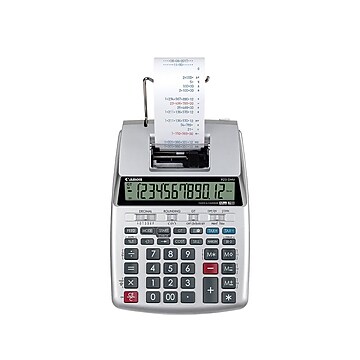
- Printing calculator offers 12-digit VFD display for convenient viewing
- Prints up to 3.7 lines per second for quick, clear documentation
- Dimensions: 3.08"H x 8.19"W x 12.02"D
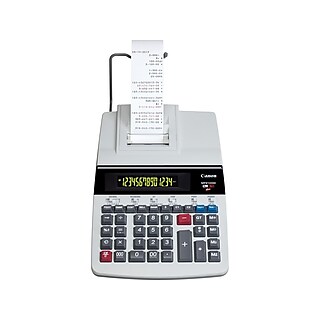
Canon (MP11DX-2) 12-Digit Printing Calculator, Silver
Free Returns
Online. In store. Always free.
Learn More

About this product
Print out permanent records using this two-color printing calculator. Printing at up to 3.7 lines per second, this calculator handles fast inputs without creating backlog. A 12-digit fluorescent tube display lets you view the current number in high-definition, and the large number of digits prevents overflow or truncation errors. Positive numbers are printed in black, and negative numbers are printed in red, allowing you to easily differentiate between various transactions. Internal features include tax calculation tips, a clock calendar and rounding options (up, off and down). With these operations as well as cost/sell/margin stored to memory, this Canon high-speed printing calculator covers a variety of basic business functions.
- Printing calculator offers 12-digit VFD display for convenient viewing
- Prints up to 3.7 lines per second for quick, clear documentation
- Dimensions: 3.08"H x 8.19"W x 12.02"D
- Powered by any standard AC outlet, eliminating the need for expensive batteries
- Four-key memory keeps often-used figures accessible for faster calculations
- Streamline financial calculations with profit margin, currency conversion, tax calculation, cost, sell, and margin functions
- Decimal switch, rounding switch, sign change, backspace, and grand total functions help you solve a variety of mathematical problems
- Package contents: paper roll and pen holder
- Prints positive numbers in black and negative numbers in red, eliminating misreads
- Clock and calendar functions help maintain schedules
- Angled display is easy on the eyes
- Comes in silver color
- 1-year manufacturer limited warranty
Easy-to-Read Display Offers 12-Digit Readout for Accuracy
The Canon MP11DX Printing Calculator offers an easy-to-read fluorescent display. The large, fixed-angle screen shows up to 12 digits, providing accurate numbers for accounting.
Profit-Margin and Tax-Rate Features Save Time and Ensure Consistent Results
The Canon Printing Calculator comes with a profit-margin feature, which calculates selling price or discount based on desired profit margins. The tax-rate feature allows users to save rates that they frequently work with, saving time and ensuring that results are accurate and consistent.
High-Speed, Two-Color Printer Makes Work Go Faster
The Canon MP11DX Printing Calculator features a high-speed printer that produces 3.7 lines per second, making fast printouts for documentation purposes. The dual-color ribbon prints negative numbers in red and positive numbers in black, eliminating errors caused by misreads.
Package Contents
Canon MP11DX Printing Calculator, paper roll, and instruction manual.
Frequently bought together









From the manufacturer
Compare similar items
| Attributes | Canon (MP11DX-2) 12-Digit Printing Calculator, Silver | Canon (2279C001) 12-Digit Desktop Calculator, Gray/Black | Sharp (EL1197PIII) 12-Digit Printing Calculator, White | Canon (MP25DV-3) 12-Digit Printing Calculator, Gray | Casio (HR-170RC) 12-Digit Printing Calculator, Black |
|---|---|---|---|---|---|
Your product Canon (MP11DX-2) 12-Digit Printing Calculator, Silver Price is $89.99 |  Price is $58.29 | 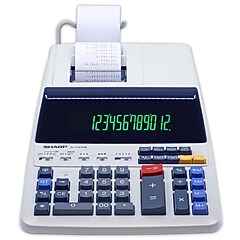 Price is $109.99 |  Price is $105.59 | 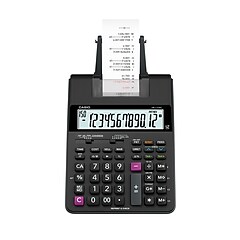 Price is $40.49 | |
| Reviews | |||||
| Delivery Information | Free delivery by Mon, Jun 08 | Free delivery by Mon, Jun 08 | Free delivery by Mon, Jun 08 | Free delivery by Mon, Jun 08 | Free delivery by Mon, Jun 08 |
| Available in my store | Yes | Yes | Yes | Yes | Yes |
| Warranty Information | 1 Year | 1 Year | 180 Day | 1 Year | 1 Year |
| Pack Qty | 1 | 1 | 1 | 1 | 1 |
| # of Colors | 2 | 2 | 2 | 2 | 2 |
| # of Memory Keys | 4 | 4 | 4 | 4 | 4 |
| Height in Inches | 3.08 | 2.2 | 3.06 | 3.6 | 2.54 |
| Printing Calculator Display | VFD | LCD | VFD | VFD | LCD |
| Width in Inches | 8.19 | 6.4 | 8.75 | 8.8 | 6.49 |
| Weight (lbs.) | 3.13 | 1.1 | 4.2 | 3.7 | 1.26 |
| Printing Calculator Speed | 4 - 5 Lines per Second | 2 - 3 Lines per Second | 4 - 5 Lines per Second | 4 - 5 Lines per Second | 0 - 2 Lines per Second |
| Calculator Type | Desktop | Desktop | Desktop | Desktop | Desktop |
| Depth in Inches | 12.02 | 9.1 | 12.88 | 12.6 | 11.61 |
| Color Family | Gray / Silver | Gray / Silver | White | Gray / Silver | Black |
| Number of Digits Displayed | 12 | 12 | 12 | 12 | 12 |
| True Color | Silver | Gray / Black | White | Gray | Black |
| Powered | AC Powered | AC Powered | Battery / AC Powered | AC Powered | Battery / AC Powered |
| Printing Color Options | Black & Red | Black & Red | Black & Red | Black & Red | Black & Red |
| Roll Width (In.) | 2.25 | 2.24 | 2.28 | 2.25 | 2.25 |
| Add To Cart | Add To Cart | Add To Cart | Add To Cart |
Featured Products


