Facebook Twitter YouTube LinkedIn
  • Welcome, Log in please.
  • Free shipping on staples.com for Rewards members.
Skip Navigation
Ink Toner Finder

Ink & Toner Finder:

  • Cartridge Number
    • Cartridge Number
    • Printer Model #
Weekly Ad
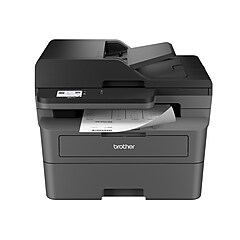
Brother® Refurbished EHL-2270DW Mono Laser Printer

Brother® Refurbished EHL-2270DW Mono Laser Printer

Item: 385272    Model: EHL2270DW

Brother® Refurbished EHL-2270DW Mono Laser Printer
4.0stars
( 41 reviews)
  • Prints up to 27 ppm (mfr specs)
  • Network ready; wired and wireless 802.11b/g
  • Automatic Duplexing (two-sided printing)
See more details
Prints up to 27 ppm (mfr specs)Network ready; wired and wireless 802.11b/gAutomatic Duplexing (two-sided printing)EachBrother® Refurbished EHL-2270DW Mono Laser PrinterPrints up to 27 ppm (mfr specs)Network ready; wired and wireless 802.11b/gAutomatic Duplexing (two-sided printing)Brother® Refurbished EHL-2270DW Mono Laser Printerhttp://s7d5.scene7.com/is/image/Staples/s0379921_sc7?$std$http://s7d5.scene7.com/is/image/Staples/s0379920_sc7?$std$http://s7d5.scene7.com/is/image/Staples/s0379921_sc7?$thb$http://s7d5.scene7.com/is/image/Staples/s0379920_sc7?$thb$http://s7d5.scene7.com/is/image/Staples/s0379921http://www.staples.com/sbd/img/res/ic/ic016-info.gifhttp://www.staples.com/sbd/img/res/ic/ic016-netready.gifhttp://www.staples.com/sbd/img/res/ic/ic016-duplex.gifhttp://s7d5.scene7.com/is/image/Staples/s0379920http://s7d5.scene7.com/is/image/Staples/s0379922_sc7?$std$http://s7d5.scene7.com/is/image/Staples/s0379922_sc7?$thb$http://s7d5.scene7.com/is/image/Staples/s0379922/Brother-Refurbished-EHL-2270DW-Mono-Laser-Printer/product_385272Brother® Refurbished EHL-2270DW Mono Laser Printer4.041
Price:
$89.99
Each

Currently Out of Stock.

Add to Favorites


REVIEW SNAPSHOT®

by PowerReviews
Brother� Refurbished EHL-2270DW Mono Laser Printer
 
4.2

(based on 41 reviews)

Ratings Distribution

  • 5 Stars


    (19)

  • 4 Stars


    (17)

  • 3 Stars


    (2)

  • 2 Stars


    (1)

  • 1 Stars


    (2)

92%

of respondents would recommend this to a friend.

Pros

  • Efficient (29)
  • Easy to set up (18)
  • Easy to use (18)
  • Fast (14)
  • Reliable (13)

Cons

  • Difficult to set up (3)

Best Uses

  • Home (14)
  • Everyday use (12)
  • Office (12)
  • Dorm (4)
  • Everyday documents (4)
    • Reviewer Profile:
    • Frequent user (15), Budget shopper (13), Heavy duty user (4), Infrequent user (4), Midrange shopper (4)
    • Primary use:
    • Personal (14), Business (8)
    • Was this a gift?:
    • No (16)

Most Liked Positive Review


Fast, fast, fast

Before purchasing, I contacted Brother and was told that a refurbished unit has new components placed in the old case; so, it actually is a new printer.

The Good
Prints incre...Read complete review

Before purchasing, I contacted Brother and was told that a refurbished unit has new components placed in the old case; so, it actually is a new printer.

The Good
Prints incredibly fast with sharp, distinct clarity. While others complain about the noise, I find it relatively quiet even though it is on my desk. Very small footprint and big savings on print cost. While the setup seems confusing, if Brother just explained in simple terms, it is actually quite easy. I set up with ethernet connection through router to Windows 7 desktop first which went flawlessly. I then attempted to connect my notebook (Windows 7) first using ethernet, but software did not load properly. Had to re-install drivers, which went fine the second time. Tried printing test sheet which worked fine. Then, disconnected the notebook from ethernet and was able to print using wifi. Third unit (Windows XP) would not load the software when connected by ethernet (error - no connection to printer). Called Brother and asked if that PC could be connected by USB directly to printer; was told it could and would not conflict with other connections. So, I will have three computers connected by three different means (ethernet, wifi and USB).

The Bad
Quick start manual is confusing and actually complicates the procedure. At the end of the manual, in small print, are instructions on how to change the settings of the printer by using a browser. This instruction should be in large print and bold letters. It is the only way to make internal changes. After finally discovering the instructions, I was able to make certain changes that I wanted, including changing the font size which was too small for me. Oh, the first time I called Brother when I was having problems installing the drivers, I was told that they are not responsible for making corrections of computer problems, which left me to work out the solutions.

All in all I am pretty happy however, after getting through the previously mentioned problems. Will have to see how well the printer holds up.

VS

Most Liked Negative Review


It didn't print

The printer was operational but I could not print from my computer (Windows 7 64-bit), even using a USB cable. The driver seem to get installed O.K., but when I tried ...Read complete review

The printer was operational but I could not print from my computer (Windows 7 64-bit), even using a USB cable. The driver seem to get installed O.K., but when I tried to print a test page it went into the print queue and then disappeared, with no response from the printer. The computer worked fine with a different printer.

Reviewed by 41 customers

Sort by

Displaying reviews 1-6

Back to top

Previous | Next »

(9 of 9 customers found this review helpful)

 
4.0

Fast, fast, fast

By Normdds

from Lake Worth, FL

About Me Infrequent User

Verified Buyer

Pros

  • Compact Design
  • Easy To Use
  • Fast Print Time
  • Low toner consumption
  • Sharp detail

Cons

  • Instructions confusing
  • No complete manual
  • Some problems with set-up

Best Uses

  • Everyday documents
  • Professional Documents

Comments about Brother� Refurbished EHL-2270DW Mono Laser Printer:

Before purchasing, I contacted Brother and was told that a refurbished unit has new components placed in the old case; so, it actually is a new printer.

The Good
Prints incredibly fast with sharp, distinct clarity. While others complain about the noise, I find it relatively quiet even though it is on my desk. Very small footprint and big savings on print cost. While the setup seems confusing, if Brother just explained in simple terms, it is actually quite easy. I set up with ethernet connection through router to Windows 7 desktop first which went flawlessly. I then attempted to connect my notebook (Windows 7) first using ethernet, but software did not load properly. Had to re-install drivers, which went fine the second time. Tried printing test sheet which worked fine. Then, disconnected the notebook from ethernet and was able to print using wifi. Third unit (Windows XP) would not load the software when connected by ethernet (error - no connection to printer). Called Brother and asked if that PC could be connected by USB directly to printer; was told it could and would not conflict with other connections. So, I will have three computers connected by three different means (ethernet, wifi and USB).

The Bad
Quick start manual is confusing and actually complicates the procedure. At the end of the manual, in small print, are instructions on how to change the settings of the printer by using a browser. This instruction should be in large print and bold letters. It is the only way to make internal changes. After finally discovering the instructions, I was able to make certain changes that I wanted, including changing the font size which was too small for me. Oh, the first time I called Brother when I was having problems installing the drivers, I was told that they are not responsible for making corrections of computer problems, which left me to work out the solutions.

All in all I am pretty happy however, after getting through the previously mentioned problems. Will have to see how well the printer holds up.

  • Primary use:
  • Personal

Comment on this review(earn points)

(1 of 1 customers found this review helpful)

 
5.0

Good / inexpensive printer **read**

By calcon

from Santa Fe Springs, CA

About Me Frequent User

This customer has reached Intern level on the Staples.com Leaderboard

Pros

    Cons

    • Default Toner Setting

    Best Uses

      Comments about Brother� Refurbished EHL-2270DW Mono Laser Printer:

      This is a very good printer but it does a poor job of keeping track of toner usage. It will think you are out of toner when you really have a lot left. The worst part is that once it thinks you are out of toner, the printer will stop until a NEW toner is installed (can not transfer from another printer). The best way to prevent this is a configuration setting during setup. There is an option of what to do with toner is out: C = continue (printing) or S = stop. The default is STOP.

      I have 6 of these in use and I have changed configuration for all of them and now get full usage out of the toner.

      By the way, I used these as WIRED and do not have experience with the wireless operation. As wired, I have no problem with speed. None have failed

      Comment on this review(earn points)

      (1 of 1 customers found this review helpful)

       
      5.0

      Good Job Brother on this one

      By Dan,M

      from Michigan

      About Me Frequent User

      Verified Buyer
      This customer has reached Intern level on the Staples.com Leaderboard

      Pros

      • Efficient
      • Fast
      • Quiet
      • Sharp Detail

      Cons

        Best Uses

        • Home

        Comments about Brother� Refurbished EHL-2270DW Mono Laser Printer:

        This is the fastest printer I have ever owned, and the best at two-sided pages. Thanks for a good product.

        Comment on this review(earn points)

        (1 of 1 customers found this review helpful)

         
        5.0

        Highly recommended

        By The plant guy

        from Summerville SC

        About Me Heavy Duty User

        Verified Buyer
        This customer has reached Intern level on the Staples.com Leaderboard

        Pros

        • Efficient

        Cons

          Best Uses

          • Dorm
          • Home
          • Office

          Comments about Brother� Refurbished EHL-2270DW Mono Laser Printer:

          Great buy. Saved over $50 from a new one and spent less than buying a replacement drum for my old brother printer. Will do it again

          Comment on this review(earn points)

          (1 of 2 customers found this review helpful)

           
          1.0

          It didn't print

          By pk

          from bronx, ny

          About Me Budget Shopper

          Verified Buyer

          Pros

            Cons

            • Difficult To Set Up

            Best Uses

            • Doorstop

            Comments about Brother� Refurbished EHL-2270DW Mono Laser Printer:

            The printer was operational but I could not print from my computer (Windows 7 64-bit), even using a USB cable. The driver seem to get installed O.K., but when I tried to print a test page it went into the print queue and then disappeared, with no response from the printer. The computer worked fine with a different printer.

            • Primary use:
            • Personal
            • Was this a gift?:
            • No

            Comment on this review(earn points)

             
            4.0

            GREAT PRODUCT!!

            By Travel Agent Specialist

            from Carroll, IA

            About Me Frequent User

            Verified Buyer
            This customer has reached Intern level on the Staples.com Leaderboard

            Pros

            • Efficient
            • Fast
            • Quiet

            Cons

              Best Uses

              • Home
              • Office

              Comments about Brother� Refurbished EHL-2270DW Mono Laser Printer:

              We just purchased this printer for our small office. The one complaint I read on other comments was the difficulty setting this printer up. I just followed the instructions and it went smoothly. If you are going wireless you have to be knowledgeable about your wireless router otherwise it can be difficult to set up. This printer is quick printing and the pages are clear.

              Comment on this review(earn points)

              Displaying reviews 1-6

              Back to top

              Previous | Next »

              Do you have questions about this product?(earn points for answers!)

              get answers from real customers and in-house experts with AnswerBox.

              4 Questions | 4 Answers
              Displaying questions 1-4
              • Q:

                I do not understand from the answers already posted whether a new cartridge is included in this refurbished printer. What is a starter kit? Thank you.
                Asked on 1/1/2013 by Anonymous

                1 answer

                • A:

                  The "starter kit" is a new printer cartridge that has less toner in it than the normal cartridge. It's a supply to get your started.

                  Answered on 1/1/2013 by Community Answer from None
              • Q:

                Most mac laptops don't accept disks anymore. I noticed that to install the printer drives on your computer, you use a CD...what do you do if you don't have a way of using a CD? I have a Macbook laptop version 10.6.8.
                Asked on 10/2/2012 by ari from seattle, wa

                1 answer

                • A:

                  The Brother printer's drivers are readily available on the Brother website for download.

                  Answered on 10/2/2012 by Community Answer from None
              • Q:

                I understand that this product is refurbished.
                Are the Started toner and Drum Unit are used one? If these 2 are used, is there a ball-park of how much is left. Thank you!
                Asked on 9/23/2012 by Kumar from VA

                1 answer

                • A:

                  Consumable items are never refurbished. For all intents and purposes they are considered part of the packaging. All Refurbished devices are shipped with a new "Starter Kit," Only the Core device itself has been Refurbished.

                  Answered on 9/23/2012 by Community Answer from None
              • Q:

                Is this printer a black and white printer, or color as well?
                Asked on 8/27/2012 by Jo from Manhattan NY

                1 answer

                • A:

                  The Brother EHL-2279DW laser printer prints using black toner only.

                  Answered on 8/27/2012 by Community Answer from None
              Displaying questions 1-4

              Do you have a question about this product? 

              1-year Extension Product Replacement Plan ($60-$99.99)
              Item: 423435
              Model: FedWarr111

              1-year Extension Product Replacement Plan ($60-$99.99)

              • Plans for all other technology products
              • Including printers, desktop PCs, shredders, digital cameras, gps units, networking equipment, cordless phones, lamps, time clocks, cash registers
              • 1 year extension of manufacturer’s warranty
              Price:
              $18.00
              EACH
              Staples 7-Outlet 2250 Joule Surge Protector with Dataline Protection, Black
              Item: 764397
              Model: 16947

              Staples 7-Outlet 2250 Joule Surge Protector with Dataline Protection, Black

              Reviews for Staples 7-Outlet 2250 Joule Surge Protector with Dataline Protection, Black
              4.5stars
              (98 reviews)
              • 7 outlets
              • 2250 Joules
              • Dataline (phone/modem/fax/DSL) protection
              •  Telephone & Fax Protection
              Price:
              $21.99
              Each
              Brother TN-450 Black Toner Cartridge, High Yield
              Item: 889863
              Model: TN450

              Brother TN-450 Black Toner Cartridge, High Yield

              Reviews for Brother TN-450 Black Toner Cartridge, High Yield
              3.5stars
              (256 reviews)
              • Yields up to 2,600 pages
              • Original Brother TN-450 Toner Cartridges consistently deliver quality printing performance for all your important documents, photos, graphics and more
              • Authentic Brother TN-450 Toner Cartridges utilize Brother’s extensive research and development to produce blacker blacks
              Price :
              $68.49
              Each
              Buy More Save More: Buy More Save More:
              1-2 @ $68.49
              3+ @ $66.40
              Brother TN-420 Black Toner Cartridge
              Item: 889139
              Model: TN420

              Brother TN-420 Black Toner Cartridge

              Reviews for Brother TN-420 Black Toner Cartridge
              3.5stars
              (203 reviews)
              • Yields up to 1,200 pages
              • Original Brother TN-420 Toner Cartridges consistently deliver quality printing performance for all your important documents, photos, graphics and more
              • Authentic Brother TN-420 Toner Cartridges utilize Brother’s extensive research and development to produce blacker blacks
              Price :
              $44.99
              Each
              Buy More Save More: Buy More Save More:
              1-2 @ $44.99
              3+ @ $43.60
              Brother® DR-420 Drum Cartridge
              Item: 889092
              Model: DR420

              Brother® DR-420 Drum Cartridge

              • Yields up to 12,000 pages
              • Toner NOT included with drum cartridge
              Price :
              $109.99
              Each
              Buy More Save More: Buy More Save More:
              1-2 @ $109.99
              3+ @ $104.40
              Staples® Multipurpose Paper, 8 1/2in. x 11in., Case
              Item: 513096
              Model: 513096-BL

              Staples® Multipurpose Paper, 8 1/2in. x 11in., Case

              Reviews for Staples® Multipurpose Paper, 8 1/2" x 11", Case
              4.5stars
              (4640 reviews)
              • 20 lb.
              • 96 US / 109 Euro Bright
              • Bright white paper provides better contrast
              •  Letter Size (8.5" x 11")
              •  Multiple sizes available
              •  Forest Stewardship Council Certified

              Special BuySpecial Buy

              Price: $49.99 5,000/Case
              Final Price: $49.99
              5,000/Case
              Additional Offers See Details
              Buy 2, Get 1 FREE!

              To redeem add 3 of this item to your cart. Enter coupon code 85446 at check-out.

              Staples 16' Gold Series A/B USB 2.0 Cable
              Item: 847297
              Model: 18805

              Staples 16' Gold Series A/B USB 2.0 Cable

              Reviews for Staples 16' Gold Series A/B USB 2.0 Cable
              4.5stars
              (53 reviews)
              • USB A/B
              • Connects your computer to your USB device
              • 16'
              Price:
              $35.99
              Each
              Staples 7' CAT6 Patch Cable - Gray
              Item: 837374
              Model: 18787

              Staples 7' CAT6 Patch Cable - Gray

              Reviews for Staples 7' CAT6 Patch Cable - Gray
              4.5stars
              (11 reviews)
              • Cat6
              • Connects 2 network devices for high speed internet access
              • 7'
              Price:
              $19.99
              EACH