Cart Summary
Cart   
  Checkout
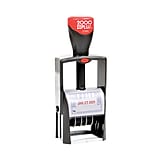
Cosco® Automatic Numbering Machine

Cosco® Automatic Numbering Machine

Cosco® Automatic Numbering Machine
2.5 stars
( 4 reviews)
Price:
$39.99
Each

Currently Out of Stock.

Add to Favorites
  • Item: 520159
  • Model: 026137
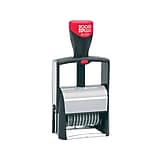
39.993/16"-high characters, up to six digitsAll metalEight different numbering optionsCosco® Automatic Numbering Machinehttp://s7d5.scene7.com/is/image/Staples/s0351245_sc7?$std$http://s7d5.scene7.com/is/image/Staples/s0351245_sc7?$thb$http://s7d5.scene7.com/is/image/Staples/s0351245/Cosco-Automatic-Numbering-Machine/product_520159Cosco® Automatic Numbering Machine2.54

Live Chat
M-F 8A-8P EST
*Pop ups must be allowed to use chat

  • 3/16"-high characters, up to six digits
  • All metal
  • Eight different numbering options
  • Includes stylus, ink bottle, 2 dry pads and instructions

REVIEW SNAPSHOT®

by PowerReviews
Cosco® Automatic Numbering Machine
 
2.3

(based on 4 reviews)

Ratings Distribution

  • 5 Stars


    (0)

  • 4 Stars


    (1)

  • 3 Stars


    (1)

  • 2 Stars


    (0)

  • 1 Stars


    (2)

50%

of respondents would recommend this to a friend.

Pros

    Cons

      Best Uses

          • Primary use:
          • Business (3)

        Reviewed by 4 customers

        Sort by

        Displaying reviews 1-4

        Back to top

         
        4.0

        CREATED JIG TO MAKE CONSISTENT NUMBERING

        By jimsam

        from bradley, illinois, usa

        About Me Budget Shopper

        Pros

        • Easy to Use
        • Quality Construction

        Cons

        • Difficult To Set Up

        Best Uses

          Comments about Cosco® Automatic Numbering Machine:

          take a box big enough to hold your form. scribe a line around the box 3" from the bottom and cut along your line. on a end on both sides, cut a 1" square; one inch from the side and 6/16" from the bottom - these allow for the pivot. set your numbering machine carefully in the corner, and then push down the lever sharply. occasionally wipe any ink from the bottom and the body of the machine. this should give consistent and sharp numbers. jimsam

          • Primary use:
          • Personal
          • Was this a gift?:
          • Yes

          Comment on this review

          (1 of 1 customers found this review helpful)

           
          1.0

          Hard to read

          By MD

          from Monterey, CA

          About Me Midrange Shopper

          Pros

          • None

          Cons

          • Fonts hard to read

          Best Uses

            Comments about Cosco® Automatic Numbering Machine:

            Cheap imported garbage. Will spend more to buy USA made.

            • Primary use:
            • Business

            Comment on this review

            (3 of 3 customers found this review helpful)

             
            1.0

            What a mess

            By Kathy

            from Compton

            About Me Quality Oriented

            Verified Buyer

            Pros

            • Sturdy
            • Well Made

            Cons

            • Doesn't Last
            • Messy
            • Numbers hard to turn
            • Runs Out Quickly

            Best Uses

            • In the box

            Comments about Cosco® Automatic Numbering Machine:

            I purchased this item to number 2600 pages of paper for a criminal trial. I had to redo numerous pages because the stamp doesn't work well unless you have a pile of paper. Installing the ink pad is messy, the numbers are hard to see and hard to set up.

            • Primary use:
            • Business

            Comment on this review

            (5 of 5 customers found this review helpful)

             
            3.0

            Good product. Print not too clear.

            By V

            from Boston, MA

            About Me Quality Oriented

            Verified Buyer

            Pros

            • Attractive Design
            • Easy To Use
            • Sturdy

            Cons

            • Messy

            Best Uses

              Comments about Cosco® Automatic Numbering Machine:

              Good sturdy stamp. Does it's job. Set up kind of tricky. The prints don't come out crisp and clear.

              • Primary use:
              • Business

              Comment on this review

              Displaying reviews 1-4

              Back to top

              Do you have questions about this product?

              get answers from real customers and in-house experts with AnswerBox.

              21 Questions | 19 Answers
              Displaying questions 1-10Previous | Next »
              • Q:

                thanx laura. does setting the action bar on zero make it easier to set the wheels? i have been able to change them without doing that and i do not want to do testing now.
                Asked on 1/20/2012 by jimsam from bradley, illlinois

                0 answers

              • Q:

                this is my fourth time. i want to suppress leading zeros. the instructions sez to set the wheel twix zero and one and push down. is this the first wheel, the last wheel. or each wheel you want suppress.
                Asked on 1/19/2012 by jimsam from bradley, illinois

                0 answers

              • Q:

                this is my third time. i want to suppress leading zeros. it sez to center twix zero and one and press down. is that the first wheel, the last wheel or all the wheels i want to suppress?
                Asked on 1/18/2012 by jimsam from bradley, illinois

                0 answers

              • Q:

                how do i zero suppress leading zeroes? it says to set between zero and one and then press down. do I do that to the first wheel the last wheel or each one I want to suppress? Thanx JimSam
                Asked on 1/17/2012 by jimsam from Bradley Illinois

                2 answers

                • A:

                  You should do that for each one you wanted to suppress. Remember to set the action indicator on 0- and put the machine into lock position by depressing the handle and pushing the lock button into the shaft.

                  Answered on 1/25/2012 by Community Answer from None
                • CUSTOMER CARE

                  A:

                  You will have to raise the action indicator by disengaging the gears. Move the setting point to the desired position. The figure on the action indicator identify the following movements. 0- Repeat the same number indefinitely. To change the figures, put the machine in lock position by depressing handle by pushing the lock button into the shaft. Use the plastic stylist to move figure wheels.

                  Answered on 1/20/2012 by Laura B from Staples
              • Q:

                I need 7 digits. Is this as high as it goes? Example 8561975
                I currently write our pt's 7 digit Id#'s by hand. This takes a long time because all pt's documents must have their 7 digit ID
                # on it.
                Asked on 8/12/2011 by Anonymous

                1 answer

                • CUSTOMER CARE

                  A:

                  This product is able to print up to six digits. We carry a 7 digit numbering stamp thorough our special order catalog. To place an order for this item, please contact us by phone to place an order. When calling please refer to item number AVT9820325.

                  Answered on 8/17/2011 by Liz C from Staples
              • Q:

                I have this stamper and it used to stamp consecutively, i.e., 0001, 0002, etc. However something happened and now it just prints one number each time: 0001, 0001, etc. How do I re-set it to number consecutively?
                Asked on 5/18/2011 by Anonymous

                1 answer

                • CUSTOMER CARE

                  A:

                  I apologize, but I am unsure how you would reset it. Please contact Cosco Products at 800-308-0331 for further assistance.
                  Answered on 5/24/2011 by Renee L from Staples
              • Q:

                I would like to only use four numbers in my series but there are six digits on this item. How do I get only four numbers to print (ex: 0001, 0002, 0003, etc)?
                Asked on 3/8/2011 by DY from Minneapolis, MN

                1 answer

                • CUSTOMER CARE

                  A:

                  You will need to manually adjust the numbering machine so that only four numbers are set, leaving two blank.

                  Answered on 3/9/2011 by Darlene S from Staples
              • Q:

                I see that you say it automaticly changes the number is that after each stamp? Say you need the number on multiply pages for the document can you use it multi times with one number then change to the next?
                Asked on 2/14/2011 by Penguin68 from Palatka, Fl

                1 answer

                • CUSTOMER CARE

                  A:

                  You could set the numbering options to do it manually!

                  Answered on 2/18/2011 by Steve S. from Staples
              • Q:

                I need to know, if this item can produce an alphanumeric numbering sequence? That is, can the item list on each document a "p (Plaintiff) 00001 on a document?" or "d (defendant) 00001 on a document?" If not, can you assist me in obtaining such a numbering device?
                Asked on 12/20/2010 by jljmed from Reston, Virginia

                1 answer

                • CUSTOMER CARE

                  A:

                  The stamp does not provide the option of an alpha numeric listing. Please contact Staples at 1-800-STAPLES (1-800-782-7537) for a product suggestion at your ealiest convenience.

                  Answered on 12/23/2010 by Alicia from Staples
              • Q:

                I Will Need The Stamper To Place Annual Year On Tags (i.e. 2011) Continuously. Can This Product Automatic Be Set To Perform This Task?
                Asked on 9/8/2010 by Firefitter1 from Baltimore,MD

                1 answer

                • CUSTOMER CARE

                  A:

                  I would recommend using item 920258, 920357, or 507833.

                  Answered on 10/5/2010 by Customer Care from Staples
              Displaying questions 1-10Previous | Next »

              Do you have a question about this product? 

              This Web site is intended for use by US residents only.See International Sites.

              See our delivery policy for full details.

              Copyright 2011, Staples, Inc., All Rights Reserved.

              Questions? Call 1-800-STAPLES (1-800-782-7537) or email us at http://www.staples.com/emailus.

              Site Map | RSS Feed