Facebook Twitter YouTube LinkedIn
  • Welcome, Log in please.
  • Free shipping on staples.com for Rewards members.
Skip Navigation
Ink Toner Finder

Ink & Toner Finder:

  • Cartridge Number
    • Cartridge Number
    • Printer Model #
Weekly Ad
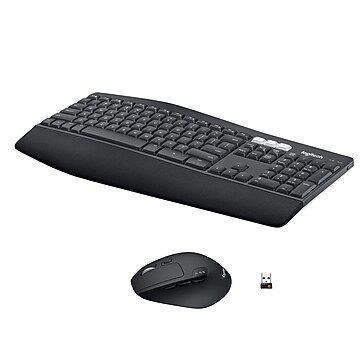
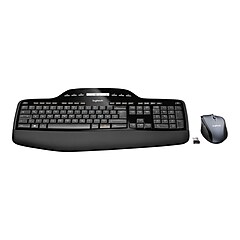
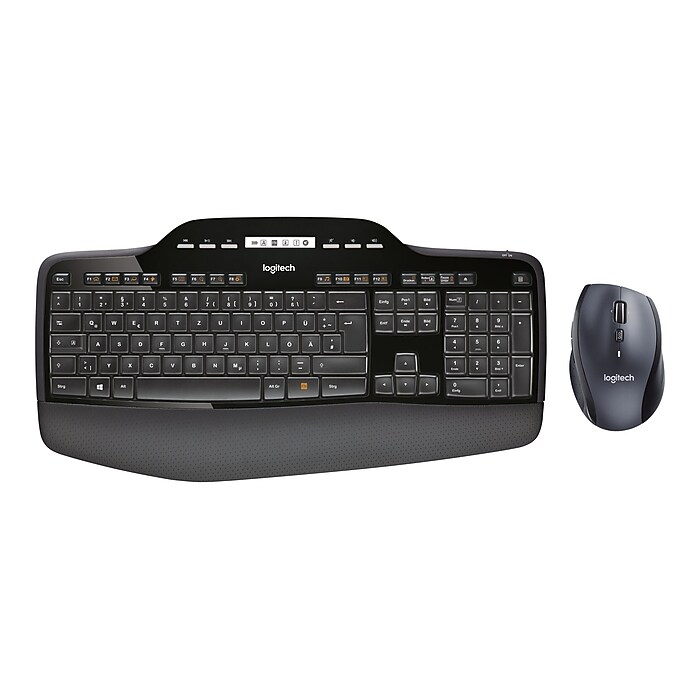
Logitech® Wireless Desktop MK710 Keyboard & Mouse

Logitech® Wireless Desktop MK710 Keyboard & Mouse

Item: 869097    Model: 920-002416

Logitech® Wireless Desktop MK710 Keyboard & Mouse
4.5stars
( 76 reviews)
  • The batteries in both the keyboard and mouse last up to three full years, so you can forget the hassle, expense and waste of frequent battery changes
  • Logitech® Incurve keys™
  • Low profile, longer key travel, cushioned palm rest
See more details
The batteries in both the keyboard and mouse last up to three full years, so you can forget the hassle, expense and waste of frequent battery changesLogitech® Incurve keys™Low profile, longer key travel, cushioned palm restEachWireless Desktop Keyboard & MouseThe batteries in both the keyboard and mouse last up to three full years, so you can forget the hassle, expense and waste of frequent battery changesLogitech® Incurve keys™Low profile, longer key travel, cushioned palm restLogitech® Wireless Desktop MK710 Keyboard & Mousehttp://s7d5.scene7.com/is/image/Staples/s0393332_sc7?$std$http://s7d5.scene7.com/is/image/Staples/s0377751_sc7?$std$http://s7d5.scene7.com/is/image/Staples/s0393332_sc7?$thb$http://s7d5.scene7.com/is/image/Staples/s0377751_sc7?$thb$http://s7d5.scene7.com/is/image/Staples/s0393332http://s7d5.scene7.com/is/image/Staples/s0392409_sc7?$std$http://s7d5.scene7.com/is/image/Staples/s0392409_sc7?$thb$http://s7d5.scene7.com/is/image/Staples/s0392409http://s7d5.scene7.com/is/image/Staples/s0377751http://s7d5.scene7.com/is/image/Staples/s0393331_sc7?$std$http://s7d5.scene7.com/is/image/Staples/s0393331_sc7?$thb$http://s7d5.scene7.com/is/image/Staples/s0393331/Logitech-Wireless-Desktop-MK710-Keyboard-Mouse/product_869097Logitech® Wireless Desktop MK710 Keyboard & Mouse4.576
Price:
$99.99
Each

Currently Out of Stock.

Add to Favorites


REVIEW SNAPSHOT®

by PowerReviews
Logitech® Wireless Desktop MK710 Keyboard & Mouse
 
4.5

(based on 76 reviews)

Ratings Distribution

  • 5 Stars


    (49)

  • 4 Stars


    (18)

  • 3 Stars


    (5)

  • 2 Stars


    (4)

  • 1 Stars


    (0)

91%

of respondents would recommend this to a friend.

Pros

  • Comfortable design (58)
  • Glides smoothly (55)
  • Fast response (51)
  • Great features (42)
  • Accurate tracking (40)

Cons

    Best Uses

    • Everyday use (57)
    • Professional (33)
    • Web browsing (31)
    • Home (8)
    • Gaming (7)
      • Reviewer Profile:
      • Power user (49), Casual user (22)
      • Primary use:
      • Business (40), Personal (36)
      • Computer Platform:
      • PC (47), Other (4)

    Most Helpful Positive Review


    Everything works and works well!

    I bought a Logitec wireless mouse and keyboard years ago and it worked flawlessly. The technology, however, has come a long way since then. The keyboard is handsome, comfortable to use. A ...Read complete review

    I bought a Logitec wireless mouse and keyboard years ago and it worked flawlessly. The technology, however, has come a long way since then. The keyboard is handsome, comfortable to use. A very smart and user-friendly design. The mouse is awsome and has many useful functions. You pay a little more for this one but so far, it is worth every cent!!

    VS

    Most Helpful Negative Review


    Really nice mouse - HORRIBLE keyboard

    I purchased the MK710 mouse and keyboard combo locally from another store. I primarily needed a mouse but bought the combo with the unifying receiver. The keyboard had some nice features. I especially liked...Read complete review

    I purchased the MK710 mouse and keyboard combo locally from another store. I primarily needed a mouse but bought the combo with the unifying receiver. The keyboard had some nice features. I especially liked the LCD display that showed caps lock and num lock status. However that is about all I liked about it. The flat smooth keys made touch typing very difficult. I rarely look at a keyboard when typing, and typically just put my hands on the keyboard and type. Not with this keyboard, you really need to look just to get your hands in the right position. The low profile keys have very little spacing between them which makes it very easy to hit the wrong key and you don't get the tactile feedback of the edges of the keys as you type. It's really worse than it would seem. The function keys were small and had alternate functions for things other keyboards have dedicated alternate buttons for such as launching email. This was marginally annoying, but I could have lived with that. My daughter who normally doesn't use my computer used the keyboard for just a couple of minutes and immediately commented about the keyboard. I really don't see the need for the low profile desktop keyboard, other than to make it look cheap, and to make it cheap. The whole keyboard looks and feels cheap. On a laptop there is a reason to make low profile keyboards, but not for a desktop keyboard.

    The mouse on the other hand I liked, for the most part. The mouse is ergonomic and fits reasonably well in my hand. It is still a little smaller than the Microsoft Mouse it replaces, but works much better. The mouse movement is smooth and accurate and doesn't have any of the lags that the Microsoft Mouse had when left idle. The scroll wheel has two modes, a free wheeling flywheel mode, and another mode with the more typically click stop. There is a mechanical button to switch between the two modes. In the click mode it works fine and as expected. The flywheel mode is really nice but has some minor problems that seem to vary by mouse (more below). The flywheel works really well, and lets you scroll really quickly through web pages and documents. You can still easily control where you are, as long as your finger is on the scroll wheel. However when you let go of the scroll wheel, even if it was stopped, it moves, usually up and makes the web page or document move from where you selected. If you are extremely careful, and slowly remove your finger from the wheel it will do it a little less. It almost feels as if the wheel is unbalanced and if you let go with a "heavy" part up it will roll down. The mouse click is a little quieter than the Microsoft mouse, which I strongly prefer. It is easier to click and makes much less noise. The two side buttons (default forward and back buttons) are fairly well placed. They are a little small and tend to be slightly difficult to press, but overall they are fine. There is another almost hidden third button on the side that you can hit with your thumb. It defaults to windows window selection.

    I subsequently returned the keyboard and mouse combo and bought the mouse by itself. Staples actually has it on sale at the time of this writing. While it is the same model, it seems much better and doesn't seem to roll by itself after you let go. There is either slightly more friction (although it still spins very freely), or is better balanced. Whatever the case it is better than the same model that was bundled with the keyboard. It does have some jitter though. When you let go of the scroll wheel it will sometime jump one click back and forth for a few times and then settle down.

    So the summary is that I really didn't like the keyboard at all. While it had some nice features, the main feature of typing was in my opinion horrible. The mouse however I really like. Yes, the scroll wheel can be finicky and sometimes annoying, but overall the mouse is really good, and MUCH better than the Microsoft Wireless Laser Mouse 5000 that it will be replacing.

    Reviewed by 76 customers

    Sort by

    Displaying reviews 1-5

    Back to top

    Previous | Next »

     
    4.0

    Love the keyboard, mouse has loud click

    By Larz

    from MI

    About Me Midrange Shopper

    Verified Buyer

    Pros

    • Easy To Set Up
    • Easy to Use
    • Efficient

    Cons

      Best Uses

      • Everyday Use

      Comments about Logitech® Wireless Desktop MK710 Keyboard & Mouse:

      The keyboard is very quiet (key strikes) but the mouse left and right clicks can easily be heard through my 4-man cube at work. I love the keyboard's display screen and feel of the keys and wrist pad. The scrolling features on the mouse work very well and it fits nicely in my hand. I recommend this combo for any work at a table or desk. It is awkward to use this keyboard on my lap when I am working at home on the couch using a monitor. Another feature that is a concern is the weight (which is a little on the heavier side. I can feel a significance of the added weight in my laptop backpack with this keyboard compared to my previous one (which was not wireless).

      • Primary use:
      • Business
      • Was this a gift?:
      • No

      Comment on this review(earn points)

       
      5.0

      I am going to buy a second one.

      By Hollis

      from Rochester MN

      About Me Casual User

      Verified Buyer

      Pros

      • Comfortable Design
      • Fast Response
      • Glides Smoothly
      • Great Features
      • Works On Any Surface

      Cons

        Best Uses

        • Everyday Use

        Comments about Logitech® Wireless Desktop MK710 Keyboard & Mouse:

        The set up was well documented and easy to follow.
        The FN Keys are super and easy to learn with the graphics on the F number keys.I like the two level legs on the key board. The battery level indicator is anothe plus and the small receiver is a big improvement and teh extension cord for the receiver really allows freedom for the key board. This is the best ever key board I have used since the IBM selectric but nowI am dating myself. And finally the free shipping is great since my local store doen not stock this item. (I wonder why/)

        • Primary use:
        • Personal
        • Computer Platform:
        • Other

        Comment on this review(earn points)

         
        5.0

        Best keyboard ever!

        By Ann at the office

        from Shrewsbury, Ma

        Verified Buyer

        Pros

        • Comfortable Design

        Cons

          Best Uses

            Comments about Logitech® Wireless Desktop MK710 Keyboard & Mouse:

            Love the feel of my new keyboard. I had wanted a new keyboard for a long time and when I by chance sat down at another employee's desk to use her computer, I was amazed at how nice her keyboard was. I immediately turned it over to check out the model number and hytailed it to my nearest Staples store.

            • Primary use:
            • Business
            • Computer Platform:
            • PC

            Comment on this review(earn points)

             
            5.0

            Exactly What I Needed

            By FrankL

            from Rome, GA

            About Me Power user

            Verified Buyer

            Pros

            • Accurate Tracking
            • Comfortable Design
            • Fast Response
            • Glides Smoothly
            • Great Features
            • Works On Any Surface

            Cons

              Best Uses

              • Everyday Use
              • Professional
              • Web Browsing

              Comments about Logitech® Wireless Desktop MK710 Keyboard & Mouse:

              Works wonderful, key strikes are smooth, the "F" keys are a lot bigger/better to use. No cons for me.

              • Primary use:
              • Business
              • Computer Platform:
              • PC

              Comment on this review(earn points)

               
              2.0

              MAY NOT WORK IN TV APPLICATIONS

              By Mo

              from North Las Vegas, NV

              About Me Casual User

              Verified Buyer

              Pros

              • Comfortable Design
              • Glides Smoothly

              Cons

                Best Uses

                • Everyday Use
                • Web Browsing

                Comments about Logitech® Wireless Desktop MK710 Keyboard & Mouse:

                Have been unable to get:
                1. Product working with wireless network so that it can be used with Samsung "Smart TV."
                2. Response from Logitech Technical Support to resolve above.

                • Primary use:
                • Personal
                • Computer Platform:
                • Other

                Comment on this review(earn points)

                Displaying reviews 1-5

                Back to top

                Previous | Next »

                Do you have questions about this product?(earn points for answers!)

                get answers from real customers and in-house experts with AnswerBox.

                23 Questions | 23 Answers
                Displaying questions 1-10Previous | Next »
                • Q:

                  does this mouse work on any surface like the Anywhere MX?
                  Asked on 3/29/2013 by Garynak

                  1 answer

                  • A:

                    No. The bundle contains the wireless Marathon Mouse M705. The laser sensor does not work on glass or mirrors, but will work on challenging surfaces like a polished desk.

                    Answered on 3/30/2013 by Community Answer from None
                • Q:

                  I have always enjoyed the "On Screen" notifier that reminded me of "Caps On/Off". Does this keyboard have this feature, or only the LCD display?
                  Asked on 1/14/2013 by Anonymous

                  1 answer

                  • A:

                    Yes the Logitech Wireless Desktop MK710 Keyboard does come with the onscreen "CAPS LOCK" display.

                    Answered on 1/14/2013 by Community Answer from None
                • Q:

                  is there a specific keyboard tray for underdesk mounting for this keyboard?
                  Asked on 11/28/2012 by Christy from Solana Beach, CA

                  1 answer

                  • A:

                    No, this is a keyboard which should fit most standard keyboard trays.

                    Answered on 11/28/2012 by Community Answer from None
                • Q:

                  Is this keyboard illuminated so you can work in dim light?
                  Asked on 8/15/2012 by matt

                  1 answer

                  • A:

                    The Logitech® Wireless Desktop MK710 Keyboard & Mouse does not have a back lit keyboard.

                    Answered on 8/15/2012 by Community Answer from None
                • Q:

                  I currently have a Logitech wireless keyboard & mouse that is seeing it's last days (5 yrs later). I have a Dell Optiplex 745 with vista 7 - will this equipment work with what I have? My last Logitech didn't work with the new system hence why I had to replace it... advise?
                  Asked on 5/22/2012 by Janet

                  1 answer

                  • A:

                    The Logitech harvest MK710 keyboard & mouse set utilize a regular USB plug in, so yes, they will work perfectly on your Optiplex 745 provided you have an open USB port.

                    Answered on 5/22/2012 by Community Answer from None
                • Q:

                  Does the keyboard have any USB ports?
                  Asked on 1/19/2012 by Zach from Rhode Island

                  0 answers(earn bonus points)

                • Q:

                  Does this keyboard have an indicator light for the Caps Lock, Number Lock and Scroll Lock?
                  Asked on 11/22/2011 by Anonymous

                  1 answer

                  • CUSTOMER CARE

                    A:

                    Yes, there is a LCD dashboard located in the middle of the top of the keyboard; it references the caps lock, number lock, scroll lock and the battery life.

                    Answered on 12/6/2011 by Kayla T. from Staples
                • Q:

                  Does the mouse have 4-way scrolling, ie, tilt wheel?
                  Asked on 11/2/2011 by Anonymous

                  1 answer

                  • CUSTOMER CARE

                    A:

                    Yes the mouse does have 4-way scrolling. If you were needing assistance placing an order please feel free to give our customer service line a call at 800-333-3330 and we would be more then happy to assist you further.

                    Answered on 11/4/2011 by Sarah P from Staples.
                • Q:

                  Will I be able to use this with my desktop computer.
                  Asked on 10/16/2011 by Anonymous

                  1 answer

                  • CUSTOMER CARE

                    A:

                    Yes, this and other keyboards that utilize a USB receiver are compatible with your laptop. If you were needing assistance placing an order please feel free to contact our customer service line at 800-333-3330 and we will be happy to assist you further.

                    Answered on 10/21/2011 by Sarah P from Staples
                • Q:

                  Is this keyboard compatible with my Dell Vostro laptop?
                  Asked on 8/10/2011 by Tamie from Centennial CO

                  0 answers(earn bonus points)

                Displaying questions 1-10Previous | Next »

                Do you have a question about this product?