Help Center
Quick Links
Page 1 of 1


The Staples mobile app makes picking up your order fast and easy. Before you arrive, make sure you’re logged into the app and your location services are turned on.
1. Open the app when you arrive
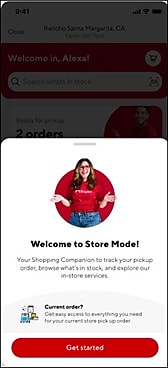
When you walk into the store, open your Staples mobile app.
If you’re signed in and location is on, you’ll see a welcome screen for Store Mode.
Tap Get started.
2. Look for your pickup barcode
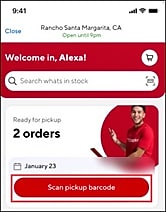
If you have an order that’s ready for pickup, you’ll see a Scan for pickup barcode button.
Tap the button to open your barcode.
3. Show your barcode to the associate
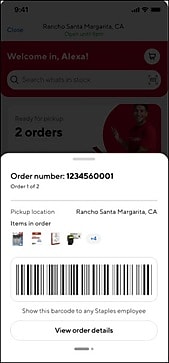
Your pickup barcode will appear on the screen.
A Staples associate will scan it to find your order.
4. Picking up more than one order
If you have multiple orders ready, simply swipe left to see the next barcode.