


Follow the steps below to return your damaged or defective item and request a replacement. We will also refund any applicable shipping charges.
1. Click here or select the Orders icon then Purchase History from the menu.
Note: If you are not logged in or checked out as a guest, enter the order number and delivery zip code and click Look up.
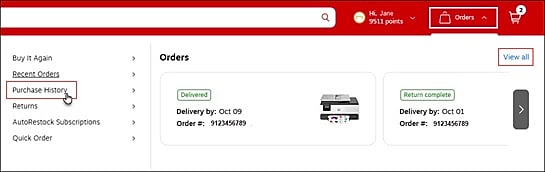
2. Find your order and click Returns.
NOTE: The Return eligibility expiry date shows the last day you can return your item. If the date shown has already passed, the item can no longer be returned. You’ll find this date under the item description on the Order details page.

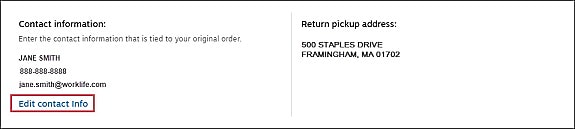
3. Verify your Contact information and Return pickup address. Select Edit contact info if you need to make changes.
4. Confirm the number of boxes to be picked up.

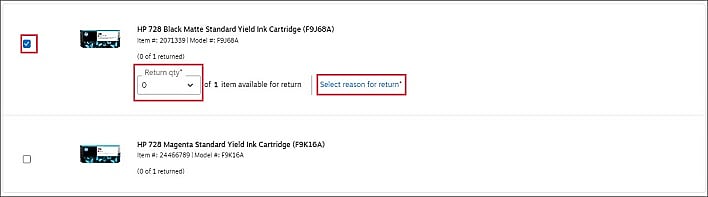
5. Check the box for the items you want to return. Select the quantity you're returning then click Select reason for return and choose the option that is most applicable to you:
- Packaging and item are damaged
- Item is damaged
- Defective/does not work properly
6. Check Yes to have us ship a replacement product free of charge. Click Continue.
7. A banner will display at the top of your screen with a red Submit return button once all required fields are completed. Select to complete your return.
8. Your exchange is now being processed. You will receive an email from us detailing your return instructions and a link to a printable return label (if applicable), as well as the expected delivery date of any replacement items.
9. Follow the return instructions included in the email to ensure proper return processing of your damaged or defective item. For more information about return labels, click here.
10. If you need to check the status of your return or replacement items, visit Order Details which can be located via the Purchase history page.
Note: When you request a replacement item be shipped to you, this is shipped free of charge and therefore you will not receive a refund for the damaged/defective item being returned.