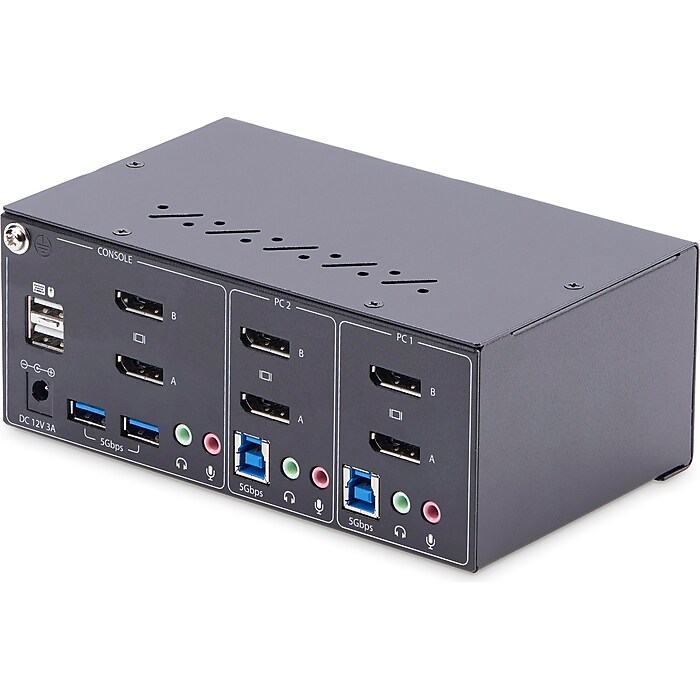

- Dual-port KVM switch to share a mouse, keyboard, USB 5Gbps hub, and dual 4K 60Hz DisplayPort displays between two DisplayPort-enabled computers
- Console interfaces: 2 x DisplayPort, 2 x USB Type-A (9-pin, 5Gbps), 2 x USB 2.0 Type-A (4-pin, 480Mbps), 2 x 3.5mm stereo ports, 1 x barrel power connector (size N; OD: 5.5; ID: 2.5)
- Host connectors: 4 x DisplayPort, 2 x USB 3.2 Gen 1 Type-B (9-pin, 5Gbps), 4 x 3.5mm stereo ports (female, three-position)
StarTech P2DD46A2-KVM-SWITCH USB DisplayPort 2-Port Dual-Monitor KVM Switch
Free Returns
Online. In store. Always free.
Learn More



About this product
This StarTech dual-monitor KVM switch enables users to switch between two desktops that are USB-A and DisplayPort enabled. It allows for the sharing of dual-4K 60Hz DisplayPort monitors, a keyboard and mouse, and two USB 5Gbps devices. USB Emulation technology enables faster switching of a keyboard, video, and mouse compared to traditional KVMs. USB Emulation also ensures compatibility with combination keyboards/mice as well as keyboards featuring additional function keys. This TAA-compliant KVM switch supports dual-4K 60Hz DisplayPort monitors, making it great for working with high-resolution graphics or video. Additionally, it offers two USB 3.2 Gen 1 (5Gbps) Hub ports for fast data transfer and two USB 2.0 HID ports for the keyboard and mouse.
- Dual-port KVM switch to share a mouse, keyboard, USB 5Gbps hub, and dual 4K 60Hz DisplayPort displays between two DisplayPort-enabled computers
- Console interfaces: 2 x DisplayPort, 2 x USB Type-A (9-pin, 5Gbps), 2 x USB 2.0 Type-A (4-pin, 480Mbps), 2 x 3.5mm stereo ports, 1 x barrel power connector (size N; OD: 5.5; ID: 2.5)
- Host connectors: 4 x DisplayPort, 2 x USB 3.2 Gen 1 Type-B (9-pin, 5Gbps), 4 x 3.5mm stereo ports (female, three-position)
- Dimensions: 2.6"H x 3.9"W x 6.4"D; weight is 1.7 lbs.
- USB Emulation enables fast switching of a keyboard, video, and mouse between two DisplayPort and USB-A enabled desktops
- USB Emulation ensures compatibility with combo keyboards/mice, as well as keyboards featuring additional function keys
- TAA-compliant DisplayPort 1.2 KVM switch supports up to two 4K 60Hz DisplayPort monitors with two USB 3.2 Gen 1 (5Gbps) hub ports and two USB 2.0 HID ports
- Great for CAD/CAM, video editing, and content creation applications
- Can be controlled via push buttons or hot keys, with an audible buzzer providing confirmation
- LEDs provide quick visual port selection status; listen to audio from one computer, while controlling the other
- Durable steel housing helps prevent electromagnetic interference (EMI), enhancing stability and reliability of the KVM
- Sturdy construction makes it perfect for installation in a variety of environments; features a 8kV Air/6kV contact ESD protection
- No drivers or software required
- Box contains: KVM switch, universal power adapter (NA/JP, EU, UK, NZ), and a quick-start guide
- 2-year manufacturer limited warranty
Frequently bought together

















Compare similar items
| Attributes | StarTech P2DD46A2-KVM-SWITCH USB DisplayPort 2-Port Dual-Monitor KVM Switch | StarTech D86A2-2-PORT-8K-KVM USB DisplayPort 2-Port KVM Switch | StarTech C2-DD46-UA2-CBL-KVM USB DisplayPort 2-Port KVM Switch | StarTech D86A2-4-PORT-8K-KVM USB DisplayPort 4-Port KVM Switch | StarTech.com 2 Port DisplayPort Dual-Monitor KVM Switch, DisplayPort KVM, 4K 60 Hz |
|---|---|---|---|---|---|
Your product StarTech P2DD46A2-KVM-SWITCH USB DisplayPort 2-Port Dual-Monitor KVM Switch Price is $503.74 |  Price is $378.57 |  Price is $282.98 |  Price is $548.30 |  Price is $378.69 | |
| Reviews | |||||
| Delivery Information | Free delivery by Tue, Oct 20 | Free delivery by Tue, Oct 20 | Free delivery by Tue, Oct 20 | Free delivery by Tue, Oct 20 | Free delivery by Tue, Oct 20 |
| Available in my store | No | No | No | No | No |
| KVM Cable or Switch Type | KVM Switch | KVM Switch | KVM Switch | KVM Switch | KVM Switch |
| USB | Yes | Yes | Yes | Yes | Yes |
| # of Ports | 2 | 2 | 2 | 4 | 12 |
| Warranty Information | 2 Year | 2 Year | 2 Year | 2 Year | 2 Year |
| Connects Devices (To and From) | Desktops, Keyboard, Mouse, Audio Device, Monitor | Desktops, Keyboard, Mouse, Audio Device, Monitor | Desktops, monitors, peripherals | Desktops, Keyboard, Mouse, Audio Device, Monitor | Data not available |
| Connector, Port or Interface Type(s) | DisplayPort, USB Type-A (9 pin), USB 2.0 Type-A (4 pin), 3.5mm Stereo Female 3 pos, Barrel Power Connector, USB 3.2 USB Type-B (9 pin) | USB Type-A (9 pin), USB 2.0 Type-A (4 pin), DisplayPort, 3.5mm Stereo Female 3 pos, Barrel Power Connector, USB 3.2 USB Type-B (9 pin) | DisplayPort, USB 2.0 Type-A, 3.5mm stereo female 3 pos | DisplayPort, USB Type-A (9 pin), USB 2.0 Type-A (4 pin), 3.5mm Stereo Female 3 pos, Barrel Power Connector, USB 3.2 USB Type-B (9 pin) | Data not available |
| Maximum Resolution | 3840 x 2160 @60Hz | 7680 x 4320 @ 60Hz | 4096x2160 @60Hz | 7680 x 4320 @60Hz | Data not available |
| Port Selection | Push Button and Hotkeys | Push Button and Hotkeys | Push button / hotkey | Push Button and Hotkeys | Data not available |
| Number of Computers Supported | 2 | 2 | 2 | 4 | Data not available |
| Power Source | AC powered | AC Powered | Bus powered | AC powered | Data not available |
| Rack-Mountable | Not Rack-Mountable | Not Rack-Mountable | Not Rack-Mountable | Not Rack-Mountable | Data not available |
| Number of Monitors | 2 | 1 | 2 | 1 | Data not available |
| Display Port | Yes | Yes | Yes | Data not available | Yes |
| Included Components | universal power adapter (NA / JP, EU, UK, NZ), and a quick-start guide | Data not available | Data not available | universal power adapter (NA / JP, EU, UK, NZ), rubber feet, quick-start guide | Data not available |
| IP Control | No | No | No | No | Data not available |
| LED Indicators | 2 - PC LED, 2 - Hub LED | Data not available | Data not available | 4 - green: PC connected (power on), 4 - red: PC selected (power on) | Data not available |
| Input Voltage | 100 - 240V AC | 100 - 240V AC | Data not available | 100 - 240V AC | Data not available |
| Add To Cart | Add To Cart | Add To Cart | Add To Cart |
Featured Products