Help Center
Quick Links
Page 1 of 1
You can choose to get updates by email, text, or both.
How to Change Your Settings
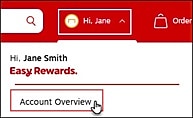
1. Select Account Overview from the Personalized Account icon in the top-right navigation.
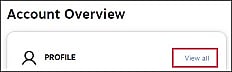
2. From the Profile tile, select View all.
3. Under Settings, select Order notifications.

4. A panel will open on the right. Here you can:
5. Click Save.