Help Center
Quick Links
Page 1 of 1
We understand how important it is to receive your order on time. Here’s how to track your shipment and what to do if you encounter an issue.
Track Your Order
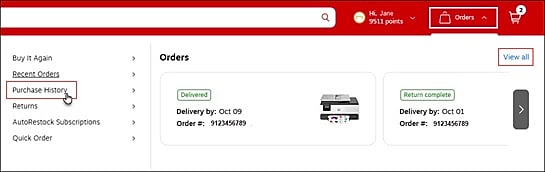
Click here or select the Orders icon then Purchase History from the menu.
Note: If you are not logged in or checked out as a guest, enter the order number and delivery zip code and click Look up.
Looking for the status of your custom print order? Click here to be redirected to our Print & Marketing website.
To view tracking for the whole order, select the Track option located in the blue bar under your order number.

A drawer will extend from the right that will display available tracking details including tracking number, carrier, and if delivered, the Signed by name or proof of delivery image.
Note: A proof of delivery image may not be available for all deliveries.
Common Order Issues
1. Tracking shows delivered but you didn’t receive the item:
2. Your order or items are delayed:
3. You received the wrong item: