
Customer Reviews for Samsung HWS60DZA 200W Wall Mountable Indoor Sound Bar Speaker, Black


Samsung HWS60DZA 200W Wall Mountable Indoor Sound Bar Speaker, Black is In-store only
Item # : 24599556
Model # : HWS60D
- Sound Bar Speaker for quality sound for your for you favorite entertainment
- 26.6"L x 2.4"W x 4.1"H
Price is $358.99
30-min pickup
See alternate delivery items
Add to list
373 reviews
Most helpful positive review
Posted Apr 25, 2026
S-Series Sound in a large vaulted Living Area
We have the Wireless Dolby Atmos Soundbar with the Samsung 75” Pro Frame television and they work exceptionally well together wirelessly the connectivity was easy and the clarity is great.
VS
Most helpful critical review
Posted Mar 20, 2026
Terrible one piece
HW-S61D This is a one piece all in one. Do not buy it. I wish I had bought a 1 piece. I’d like something with separate woofer and speakers.
Myzery
This reviewer received a free product or coupon in exchange for an unbiased review of the product
Reviewed at:
Samsung US
Posted Apr 26, 2026
Perfect for a bedroom
This is a great sound bar for a small bedroom. The clarity comes through very nice, especially with the enhance voice features. The immersion for content watching that it provided was great connectivity was simple and integrated very well with the Samsung television, and the sound stage with Q Symphony activated is beautiful


0up votes 0
0down votes 0
Report
Siberian
This reviewer received a free product or coupon in exchange for an unbiased review of the product
Reviewed at:
Samsung US
Posted Apr 25, 2026
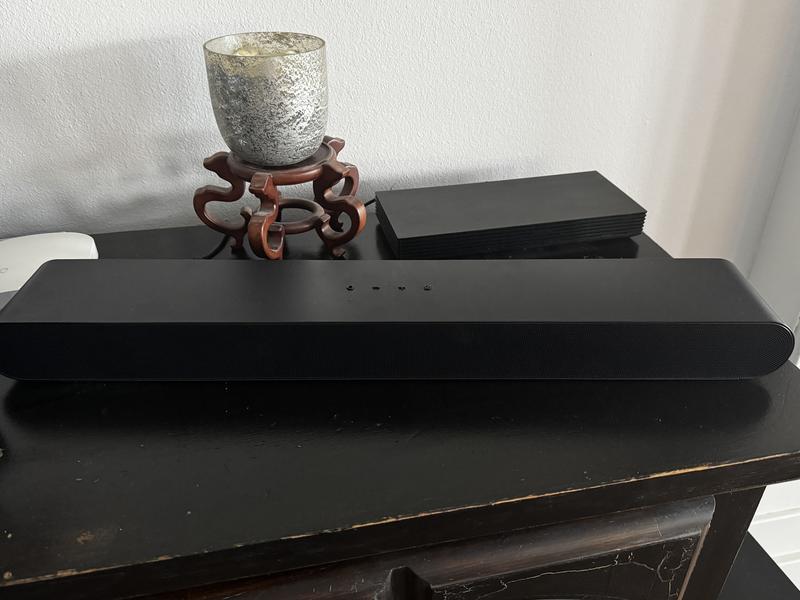
S-Series Sound in a large vaulted Living Area
We have the Wireless Dolby Atmos Soundbar with the Samsung 75” Pro Frame television and they work exceptionally well together wirelessly the connectivity was easy and the clarity is great.
0up votes 0
0down votes 0
Report
JerrBear81
This reviewer received a free product or coupon in exchange for an unbiased review of the product
Reviewed at:
Samsung US
Posted Apr 25, 2026
Jams, but sounds clear
This device had crystal clear sound quality and really jammed at my get together.
0up votes 0
0down votes 0
Report
Frosty
This reviewer received a free product or coupon in exchange for an unbiased review of the product
Reviewed at:
Samsung US
Posted Apr 20, 2026
Integration Too complex
Integration with Samsung Frame TV way too complex. Doesn’t work for all viewing modes. Drops voice channel.
0up votes 0
0down votes 0
Report
Response from Staples :
Hello Frosty,
We appreciate you taking a few moments to review the Samsung HW-S61D Soundbar. We value your feedback and will share it with our teams.
To take full advantage of your new soundbar, download the SmartThings App to your smart device. This will allow you to control your soundbar as you would with the provided remote, but with the added advantage of seeing what changes you make on your device.
To optimize your audio experience, please try the various sound modes this model offers. Press the SOUND MODE button on your remote, and then select your desired sound effect: ADAPTIVE SOUND, DTS VIRTUAL:X, MUSIC, GAME, STANDARD. When you press the SOUND MODE button it will change to the different modes in the above order.
You can further adjust TREBLE and BASS via the TONE CONTROL button.
If you are looking for additional bass, beyond what the HW-S60D can provide, consider adding the compatible SWA-W510 Wireless Subwoofer from Samsung to take your audio experience to the next level.
If you need more help, Samsung is here for you. Please call us at 1-800-SAMSUNG, Mon – Fri 8 AM – 9 PM EST, Sat & Sun 8 AM – 6 PM EST. Live Chat with an agent as well as manuals, software, creating a service ticket, and warranty info can be found at the ‘Support’ link on our Samsung website.
~ Samsung Solutions
April 22, 2026
a little annoyed
This reviewer received a free product or coupon in exchange for an unbiased review of the product
Reviewed at:
Samsung US
Posted Apr 20, 2026
inconsistent levels
In general, very good sound. Unfortunately the volume raises and lowers unexpectedly at times. Typically when going to and from a commercial. Other times it just seems random---sound will jump (annoyingly) louder by 2 or 3 levels--startiling us very quiet 70 year olds, and just as abruptly drop. If you drop it manually because it is painful, it will then drop subseq...
Read full review
0up votes 0
0down votes 0
Report
CountryD
This reviewer received a free product or coupon in exchange for an unbiased review of the product
Reviewed at:
Samsung US
Posted Apr 20, 2026
Rich sound
This soundboard works great! Delivers a rich, emersive sound, especially with the movie streaming services like Paramount +, almost a theater-like experience.
0up votes 0
0down votes 0
Report
Matt
This reviewer received a free product or coupon in exchange for an unbiased review of the product
Reviewed at:
Samsung US
Posted Apr 20, 2026
Great product
Great item for the price. Clear and crisp sound. Easy to connect. You feel immersed because you can change the settings based on what you’re using the soundbar for.

0up votes 0
0down votes 0
Report
KungFuKen
This reviewer received a free product or coupon in exchange for an unbiased review of the product
Reviewed at:
Samsung US
Posted Apr 17, 2026
Sounds like Heaven!
I dont like to give reviews, until the product that I am reviewing has had full usage. And over the time I've had with this soundbar is OP. Its clear and crisp, loud and lean, I have a neighbor who just love yo force her music on us. Brought this, easily connects via hdmi cable or Bluetooth to phones and all. Get immersed into your favorite action or horror film (jump s...
Read full review
0up votes 0
0down votes 0
Report
Soundy
This reviewer received a free product or coupon in exchange for an unbiased review of the product
Reviewed at:
Samsung US
Posted Apr 14, 2026
Sweet Soundbar
Excellent sound. The treble sounds crisp and the subwoofer makes the bass deep. It's excellent all around from listening to rave techno to watching bluey with the kids. Fits all needs.


0up votes 0
0down votes 0
Report
Jbeury
This reviewer received a free product or coupon in exchange for an unbiased review of the product
Reviewed at:
Samsung Australia
Posted Apr 13, 2026
Good sound for smaller model and price.
Bought this recently as it is a smaller model and suits the space. Sound and functions are great, don't really notice any different compared to larger sound bars with subwoofers.
0up votes 0
0down votes 0
Report
Tony
This reviewer received a free product or coupon in exchange for an unbiased review of the product
Reviewed at:
Samsung US
Posted Apr 10, 2026
Really good for the price.
Great soundbar. The audio is really clear and loud. The bass is really good as well. Very happy with the purchase.
0up votes 0
0down votes 0
Report
Kdub1
This reviewer received a free product or coupon in exchange for an unbiased review of the product
Reviewed at:
Samsung US
Posted Apr 5, 2026
Easy to Connect Sound fills room
Great soundbar for our bedroom tv. Fills the room! Easy to connect and works seamlessly with our Samsung TV. One speaker sounds like full system.

0up votes 0
0down votes 0
Report
Tzilla
This reviewer received a free product or coupon in exchange for an unbiased review of the product
Reviewed at:
Samsung US
Posted Mar 25, 2026
Great for under your monitor.
Had two of the B series and needed one more and got the D version for my work monitor/video streaming. Love the surround aspect without adding extra speakers and the bass is OK (have the wireless sub on my other S61B and it definitely kicks for its size) but more than adequate for pc use. Also take outside and plug in for backyard bbq as it's much more powerful than a p...
Read full review
0up votes 0
0down votes 0
Report
Jim from NEPA
This reviewer received a free product or coupon in exchange for an unbiased review of the product
Reviewed at:
Samsung US
Posted Mar 21, 2026
HW-60D
I like this soundbar. It does exactly what I purchased it for on my QN90 Samsung TV. I read reviews where people complained that the sound was not good. If they were looking for super sound or surround sound,, they should have purchased a home theater system. If you want good sound quality from your TV and not looking for home theater surround sound, this sound bar is ...
Read full review
0up votes 0
0down votes 0
Report
Leslie
This reviewer received a free product or coupon in exchange for an unbiased review of the product
Reviewed at:
Samsung US
Posted Mar 20, 2026
Works great w/ Samsung TV- large room/high ceiling
I needed some way to have improved clarity sound from my otherwise awesome Samsung 65 inch Neo QLED TV.
The TV is in my living room, which has a cathedral ceiling and opens up to the kitchen and foyer, so it's tricky to get decent sound. I don't need immersive sound, but was hoping for a boosted sound that integrates with the TV.
I'm very happy with the combination of...
The TV is in my living room, which has a cathedral ceiling and opens up to the kitchen and foyer, so it's tricky to get decent sound. I don't need immersive sound, but was hoping for a boosted sound that integrates with the TV.
I'm very happy with the combination of...
Read full review
0up votes 0
0down votes 0
Report
Ponkie
This reviewer received a free product or coupon in exchange for an unbiased review of the product
Reviewed at:
Samsung US
Posted Mar 20, 2026
Terrible one piece
HW-S61D This is a one piece all in one. Do not buy it. I wish I had bought a 1 piece. I’d like something with separate woofer and speakers.
0up votes 0
0down votes 0
Report
Response from Staples :
Hello Ponkie,
We appreciate you taking a few moments to review the Samsung HW-S61D Soundbar.
To take full advantage of your new soundbar, download the SmartThings App to your smart device. This will allow you to control your soundbar as you would with the provided remote, but with the added advantage of seeing what changes you make on your device.
To optimize your audio experience, please try the various sound modes this model offers. Press the SOUND MODE button on your remote, and then select your desired sound effect: ADAPTIVE SOUND, DTS VIRTUAL:X, MUSIC, GAME, STANDARD. When you press the SOUND MODE button it will change to the different modes in the above order.
You can further adjust TREBLE and BASS via the TONE CONTROL button.
If you are looking for additional bass, beyond what the HW-S60D can provide, consider adding the compatible SWA-W510 Wireless Subwoofer from Samsung to take your audio experience to the next level.
I hope this tip helps improve your sound experience. Should you need further assistance with features, functions, settings, or adjustments, please contact Samsung Customer Support. Call us at 1-800-SAMSUNG (Ask for Soundbars), Mon – Fri 8 AM – 9 PM EST, Sat & Sun 8 AM – 6 PM EST. Or visit us on the Samsung website and click on the ‘Support’ link for:
• Live Chat
• Manuals, Software, & Warranty Info
• Creating a service ticket
~ Samsung Solutions
March 24, 2026
Kevin
This reviewer received a free product or coupon in exchange for an unbiased review of the product
Reviewed at:
Samsung US
Posted Mar 17, 2026
Addition to my Samsung products
This is a great addition to my samsung TV. The sound is clear and the quality is very good
0up votes 0
0down votes 0
Report
NikNakSweeney
This reviewer received a free product or coupon in exchange for an unbiased review of the product
Reviewed at:
Samsung US
Posted Mar 14, 2026
An impressive product for a great price
The connectivity of this product is seamless, fast and easy. The clarity is impeccable and the best one I've owned so far. It was easy to integrate into my existing devices and set an amazing soundstage for all of my listening platforms.
0up votes 0
0down votes 0
Report
Darkphallen
This reviewer received a free product or coupon in exchange for an unbiased review of the product
Reviewed at:
Samsung US
Posted Mar 13, 2026
Great Value and Sound
The surround sound has great clarity and gives you the immersion feeling of being on a soundstage. Integration with existing devices was fairly simple, but I do have connectivity issues where the sound goes completely blank for a second or two at random time.
0up votes 0
0down votes 0
Report
BobbyT
This reviewer received a free product or coupon in exchange for an unbiased review of the product
Reviewed at:
Samsung US
Posted Mar 8, 2026
Clear and loud sound
For just a soundbar is very clear. Its loud. Feels like your in a movie theater. I do wish I had a little more base. I kind of wish I would have got the one woth the sub. But this sounds amazing. I used the HDMI to connect to my TV.


0up votes 0
0down votes 0
Report