Customer Reviews for Samsung The Frame LS03D 50” Smart QLED 4K UHD TV (QN50LS03DAFXZA)


Samsung The Frame LS03D 50” Smart QLED 4K UHD TV (QN50LS03DAFXZA) is Out of stock
Item # : IM1SE3580
Model # : QN50LS03DAFXZA
- Bring art and entertainment together with a sleek 50" display that looks like a real picture frame when not in use
- Enjoy stunning visuals with Samsung’s QLED technology, delivering 100% Color Volume powered by Quantum Dot for vibrant, true-to-life colors in every scene
Price is $971.99
Add to list
1354 reviews
Most helpful positive review
Posted Mar 24, 2026
Easy peasy lemon squeezy
Great pic, easy setup. Menu easy to use. Sound needs a bit of work
VS
Most helpful critical review
Posted Mar 5, 2026
Poor Support
Picture image has issues and will display only 3/5ths of the image with the rest blacked out. Service won't come out even though its under warranty
Tdub
This reviewer received a free product or coupon in exchange for an unbiased review of the product
Reviewed at:
Samsung US
Posted Mar 24, 2026
Easy peasy lemon squeezy
Great pic, easy setup. Menu easy to use. Sound needs a bit of work
0up votes 0
0down votes 0
Report
Namita903
This reviewer received a free product or coupon in exchange for an unbiased review of the product
Reviewed at:
Samsung US
Posted Mar 23, 2026
Where Technology Meets Art: The TV That Disappears
The Samsung 65” Frame TV completely redefined what a television can be in my home—it’s not just a screen, it’s a statement.
From the moment it was mounted, it blended seamlessly into my space like a true piece of art. In Art Mode, it’s stunning—guests genuinely don’t realize it’s a TV until it comes to life. The matte display is a game changer, eliminating glare and ma...
From the moment it was mounted, it blended seamlessly into my space like a true piece of art. In Art Mode, it’s stunning—guests genuinely don’t realize it’s a TV until it comes to life. The matte display is a game changer, eliminating glare and ma...
Read full review
0up votes 0
0down votes 0
Report
Wheels1990
This reviewer received a free product or coupon in exchange for an unbiased review of the product
Reviewed at:
Samsung US
Posted Mar 23, 2026
I think its great the pic frame part of it
. I dont like it takes a.seperate box jjst to work the tv with out it.it is useless :(j TV is great otherwise and except for the glare there's a glare one of the modes the art mode but other than that's good
0up votes 0
0down votes 0
Report
Asb1
This reviewer received a free product or coupon in exchange for an unbiased review of the product
Reviewed at:
Samsung US
Posted Mar 23, 2026
Incredible how it blends in
Our friends and family are in awe of this Frame they actually don't even believe it's television and that makes us thrilled because that was our goal. We even found artwork for it that blends beautifully on our picture wall.

0up votes 0
0down votes 0
Report
Mimi
This reviewer received a free product or coupon in exchange for an unbiased review of the product
Reviewed at:
Samsung US
Posted Mar 23, 2026
Looks great! Art is expensive!
Looks great on the wall, the single cord keeps things looking tidy, light and reflection adjustment is great with art, black inconsistency on the screen since first turning on and it never fixed- there were blotches that were more gray and other areas more black on a full black screen while tv is on, its always been very noticeable when watching anything and it fades to...
Read full review
0up votes 0
0down votes 0
Report
Josh
This reviewer received a free product or coupon in exchange for an unbiased review of the product
Reviewed at:
Samsung US
Posted Mar 23, 2026
Perfect tv.
Really beautiful on the Samsung easel that I bought for it. Nice picture quality and colors. Perfect brightness with different modes. None reflecting screen is amazing. Mounting was easy enough.

0up votes 0
0down votes 0
Report
Pessoa
This reviewer received a free product or coupon in exchange for an unbiased review of the product
Reviewed at:
Samsung US
Posted Mar 23, 2026
Like a painting!
Any interior designer's dream TV. I love the way it looks and the image is pretty good l. It mounts pretty close to the wall so you see no gaps. I love the teak color frame.
0up votes 0
0down votes 0
Report
Allen
This reviewer received a free product or coupon in exchange for an unbiased review of the product
Reviewed at:
Samsung US
Posted Mar 23, 2026
It is so realistic
It is so realistic ypu cannot tell it is not a painting
0up votes 0
0down votes 0
Report
DjofLB
This reviewer received a free product or coupon in exchange for an unbiased review of the product
Reviewed at:
Samsung US
Posted Mar 23, 2026
Great design all around
Beat tv ever!! Best color, size, depth and overall quality a plus!
0up votes 0
0down votes 0
Report
Tata
This reviewer received a free product or coupon in exchange for an unbiased review of the product
Reviewed at:
Samsung US
Posted Mar 23, 2026
The sound
Samsung tvs are just better quality to watch and they devices are great too . I love my washer and dryer
0up votes 0
0down votes 0
Report
Hall
This reviewer received a free product or coupon in exchange for an unbiased review of the product
Reviewed at:
Samsung US
Posted Mar 23, 2026
Good frame rate
it worked great for video game with a good frame rate
0up votes 0
0down votes 0
Report
Tv set
This reviewer received a free product or coupon in exchange for an unbiased review of the product
Reviewed at:
Samsung US
Posted Mar 21, 2026
Wow good
Good all around set up the color good there's no problem setting it up
0up votes 0
0down votes 0
Report
Steve
This reviewer received a free product or coupon in exchange for an unbiased review of the product
Reviewed at:
Samsung US
Posted Mar 20, 2026
Tv stopped working Need service
Tv stopped working this week. It bouts up and then shuts down
After many times trying this, we need to find a way to get in home service
After many times trying this, we need to find a way to get in home service

0up votes 0
0down votes 0
Report
Tony
This reviewer received a free product or coupon in exchange for an unbiased review of the product
Reviewed at:
Samsung US
Posted Mar 20, 2026
Aesthetics
Great tv, and is aesthetically pleasing. Wish I wouldn’t have got it before the pro came out. Lol
0up votes 0
0down votes 0
Report
Rick
This reviewer received a free product or coupon in exchange for an unbiased review of the product
Reviewed at:
Samsung US
Posted Mar 20, 2026
Perfect Art Look
Great custom look for our vacation condo. We highly recommend to our family and friends.
0up votes 0
0down votes 0
Report
Happy Customer
This reviewer received a free product or coupon in exchange for an unbiased review of the product
Reviewed at:
Samsung US
Posted Mar 5, 2026
Samsung Never Disappoints
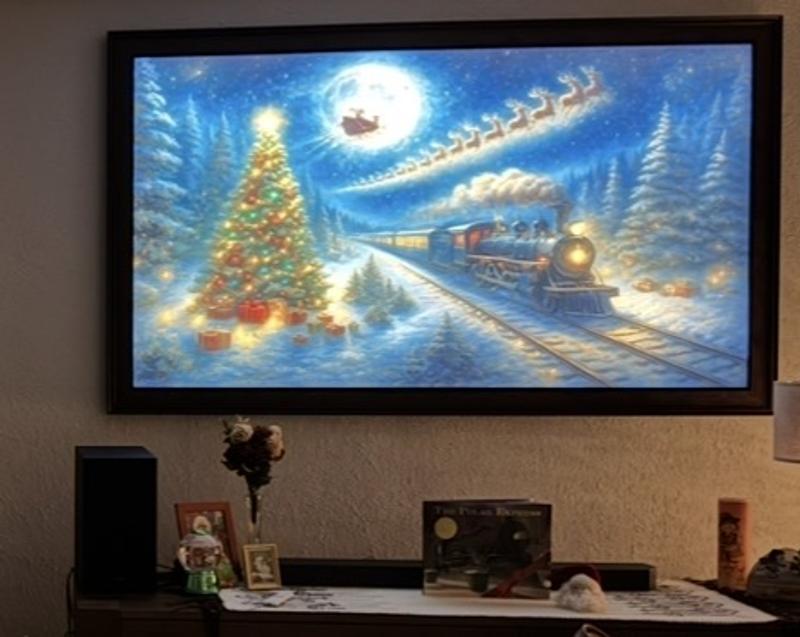
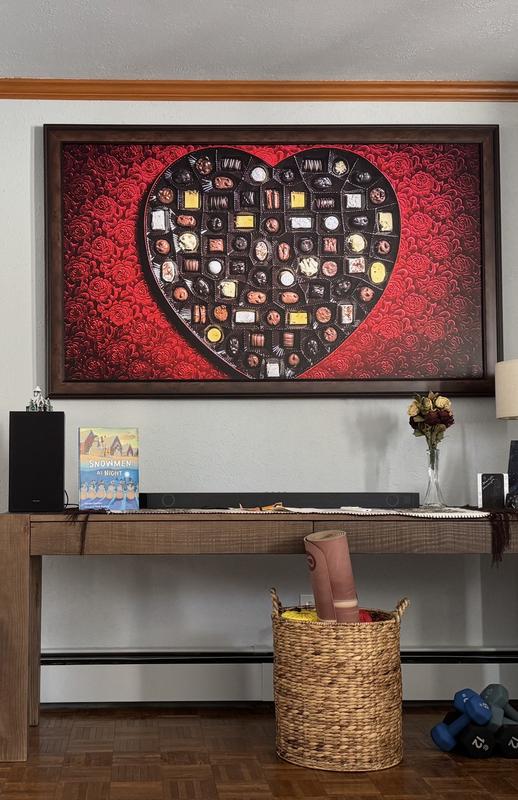
Ideal for bright, sunny, rooms. "Art Mode” turns television into a vibrant, beautiful 75” art display. Mounts flush to wall.
0up votes 0
0down votes 0
Report
jkrigas
This reviewer received a free product or coupon in exchange for an unbiased review of the product
Reviewed at:
Samsung US
Posted Mar 5, 2026
Amazing non-glare vibrant picture
The picture is wonderful - especially the no-glare aspect. Our TV is in a room with lots of natural light and the picture remains vibrant even when it is bright in the room
0up votes 0
0down votes 0
Report
KC Tech
This reviewer received a free product or coupon in exchange for an unbiased review of the product
Reviewed at:
Samsung US
Posted Mar 5, 2026
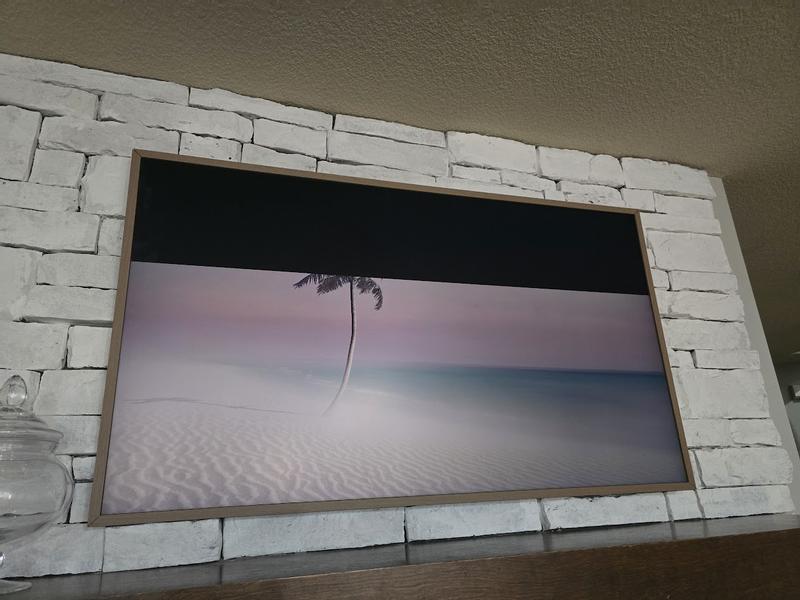
Poor Support
Picture image has issues and will display only 3/5ths of the image with the rest blacked out. Service won't come out even though its under warranty
0up votes 0
0down votes 0
Report
MR J
This reviewer received a free product or coupon in exchange for an unbiased review of the product
Reviewed at:
Samsung US
Posted Mar 2, 2026
The Frame 55 inch
Awesome television, best purchased I have ever made. Will get another one in the near future
0up votes 0
0down votes 0
Report
bnile1
This reviewer received a free product or coupon in exchange for an unbiased review of the product
Reviewed at:
Samsung US
Posted Mar 2, 2026
Great fit and love the picture
I had to get a TV to fit behind a sliding door had 1 3/4 inches of clearance has a 65 inch frame has nearly 1/2-inch clearance and have loved the rotating picture has become and accent piece
0up votes 0
0down votes 0
Report